

 Ben Whitmore
Scan source behavior has always been a gray area, i’ve been down the rabbit hole several times, and in co-managed environments it has become genuinely difficult to get clarity. Between ConfigMgr, Intune policy, GPO, the Windows Update Agent and the modern Windows Settings experience, it’s no longer obvious which component is actually in control at any given moment – heck, if any at all.
I previously tried to bring some clarity in this post, but it seems things have moved on since then and Microsoft have started trying to be “helpful” in 2503+ by setting some scan source policy for us. That, frankly, raised more questions than it was helpful.
I tested scan source behavior with the setting applied via GPO, via Intune, and with it not set at all, expecting at least some level of predictability around which update services would actually be used. What I found was consistent, but not in the way the policies or UI might lead you to expect.
It’s important to level-set on the components involved, where policy actually lives, and some nuances around caching and cleanup. That historical context matters, because without it, scan source still feels to many of us the saviour that it actually isn’t.
I should also be up-front and honest before you read on. This post may not end with a “this is the fix” ah-ha moment. But it might give you enough of a head-start to do your own testing if updates are not being offered from the update service you are expecting.
Microsoft are Configuring Scan Source (sigh)
At one point, many of us assumed that when the ConfigMgr team stopped configuring Dual Scan as Windows 11 came onto the scene, and formally stopped supporting it, they were also stepping away from directly influencing the source of truth for update scans. Admins, as ever, adapted quickly and learned how to work within that model. i.e. “Ah, we set stuff now, thats OK with me”. What’s less obvious is that Microsoft has since re-entered that space, somewhere around 2503, via remediation logic, proactively setting values like SetPolicyDrivenUpdateSourceForOtherUpdates. It’s not clear to me why they did this (someone tell me please), but it’s interesting and impactful nonetheless.
What Policy Dragons are at Play?
When client policy is applied, the ConfigMgr client writes an internal tracking value at HKLM\SOFTWARE\Microsoft\CCM\SoftwareUpdates\IsScanSourcePolicyRemoved = 0. It appears that Microsoft use this value to determine whether a cleanup routine has already executed.
I think the reason Microsoft are tracking and cleaning up at all is because they introduced a schoolboy error by setting the registry setting to enable scan source in the wrong key. They were writing UseUpdateClassPolicySource = 1 under HKLM\SOFTWARE\Policies\Microsoft\Windows\WindowsUpdate instead of under the sub key in that , AU. Because of this misplacement, during a software update scan, ConfigMgr, using WUAHandler.dll, executes a cleanup:
- Deletes the incorrectly placed registry setting
HKLM\SOFTWARE\Policies\Microsoft\Windows\WindowsUpdate\UseUpdateClassPolicySource - Removes all scan source policy values under the
HKLM\SOFTWARE\Policies\Microsoft\Windows\WindowsUpdatekey*. - Enables Scan Source correctly by setting
HKLM\SOFTWARE\Policies\Microsoft\Windows\WindowsUpdate\AU\UseUpdateClassPolicySource= 1 - * Preserves, if already configured by the admin
HKLM\SOFTWARE\Policies\Microsoft\Windows\WindowsUpdate\SetPolicyDrivenUpdateSourceForOtherUpdatesand whatever value was previously set. If this setting was not previously configured by the admin, it will be configured with a value of 1 (meaning source is set to WSUS).
After cleanup completes ConfigMgr then creates another internal tracker at HKLM\SOFTWARE\Microsoft\CCM\SoftwareUpdates\IsScanSourcePolicyRemoved2 = 0.

An important distinction in this logic is how Microsoft uses internal tracking values to control whether the remediation runs once or repeatedly. For non co-managed devices, ConfigMgr sets this internal cleanup tracker IsScanSourcePolicyRemoved2 to 1 after the first successful remediation. Once this value exists and is set to 1, the cleanup logic never runs again, ConfigMgr stops touching scan source policy entirely. However, this same tracking value remains set to 0 fo co-managed clients with the workload for Windows Updates moved over. The practical consequence is that the cleanup logic continues to execute on every ConfigMgr-initiated software update scan via WUAHandler.dll, repeatedly removing scan source policy values just before the scan runs.

The consequence of this modification means WHATEVER scan source policy you set va GPO? Yeah, thats gonna get nuked each software update scan cycle. Well, save if you had previously configured SetPolicyDrivenUpdateSourceForOtherUpdates via GPO. That value (1 or 0) is going to be kept. We’ll come onto what that means later.
tl;dr, you will likely end up with a similar registry configuration after a software update scan cycle.

Procmon Filters that you Must Have
As you start to dive into this stuff on your rainy Saturday afternoon, you are going to want proof of what I am laying out in this blog. To that end, using procmon and reading log files are going to be critical to understand any update source behaviour in your environment.
There are 3 super hero’s at play controlling which updates are going to be delivered to your device.
CcmExec.exe
The ConfigMgr client. When it initiates a scan, it does so in a managed context and tells WUA exactly what it’s allowed to do.
Command Line: C:\Windows\CCM\CcmExec.exe
Windows Update Agent (wuauserv)
Runs under svchost. This is the engine doing the actual scanning and talking to update services.
Command Line: C:\WINDOWS\system32\svchost.exe -k netsvcs -p -s wuauserv
USO / MoUpdateOrchestrator / Settings App
The modern Windows Update stack. User-initiated and scheduled scans come through here and behave very differently from ConfigMgr-initiated ones.
Command Line: "C:\WINDOWS\uus\AMD64\MoUsoCoreWorker.exe" useprivatenamespaces
I found it useful to monitor which registry values were being read and set by all 3 of these process, filtering procmon by the command line for each. Additionally, I found it useful to look at the activity around specific policy keys to understand where each of the processes above was reading policy from.
WindowsUpdate\UpdatePolicyHKLM\SOFTWARE\Policies\Microsoft\Windows\WindowsUpdateHKLM\SOFTWARE\Microsoft\PolicyManager\current\device\Update


GPCache, the Gift that Keeps on Giving
As I was testing different scenarios, I found the GP Cache key kept coming up so Id thought i’d share the little I know about it.
There is a scheduled task named Refresh Group Policy Cache that is responsible for updating the GP cache key located at HKEY_LOCAL_MACHINE\SOFTWARE\Microsoft\WindowsUpdate\UpdatePolicy\GPCache.

If you look at the XML of the task, you understand several things.
<?xml version="1.0" encoding="UTF-16"?>
<Task version="1.6" xmlns="http://schemas.microsoft.com/windows/2004/02/mit/task">
    <RegistrationInfo>
        <Version>1.0</Version>
        <SecurityDescriptor>D:P(A;;FA;;;SY)(A;;FRFX;;;LS)(A;;FRFX;;;BA)</SecurityDescriptor>
        <Source>$(@%systemRoot%\system32\updatepolicy.dll,-1000)</Source>
        <Author>$(@%systemRoot%\system32\updatepolicy.dll,-1000)</Author>
        <Description>$(@%systemRoot%\system32\updatepolicy.dll,-1001)</Description>
        <URI>\Microsoft\Windows\WindowsUpdate\Refresh Group Policy Cache</URI>
    </RegistrationInfo>
    <Principals>
        <Principal id="LocalSystem">
            <UserId>S-1-5-18</UserId>
        </Principal>
    </Principals>
    <Settings>
        <DisallowStartIfOnBatteries>false</DisallowStartIfOnBatteries>
        <StopIfGoingOnBatteries>false</StopIfGoingOnBatteries>
        <ExecutionTimeLimit>PT1H</ExecutionTimeLimit>
        <MultipleInstancesPolicy>IgnoreNew</MultipleInstancesPolicy>
        <StartWhenAvailable>true</StartWhenAvailable>
        <IdleSettings>
            <StopOnIdleEnd>false</StopOnIdleEnd>
            <RestartOnIdle>false</RestartOnIdle>
        </IdleSettings>
        <UseUnifiedSchedulingEngine>true</UseUnifiedSchedulingEngine>
    </Settings>
    <Triggers>
        <WnfStateChangeTrigger>
            <StateName>7508BCA32A1E890D</StateName>
        </WnfStateChangeTrigger>
    </Triggers>
    <Actions Context="LocalSystem">
        <ComHandler>
            <ClassId>{07369A67-07A6-4608-ABEA-379491CB7C46}</ClassId>
        </ComHandler>
    </Actions>
</Task>
The trigger type is WnfStateChangeTrigger. The Windows Notification Facility (WNF) state-change trigger isn’t time-based or logon-based. This task fires when Windows publishes a change to that specific WNF state. The state referenced is StateName>7508BCA32A1E890D</StateName>, a Windows-internal signal related to update / policy refresh (Copilot tells me this, the statename doesnt appear to be very well documented).
I don’t have a tonne of knowledge to share around the actual action. The COM object referenced is {07369A67-07A6-4608-ABEA-379491CB7C46} and the registry pointer references C:\Windows\System32\UpdatePolicy.dll.

So every time there is an update policy change, this .dll does something magical, notr related to unicorns. You can invoke gpupdate /force and watch procmon to see what happens under the hood. I just used a procmon filter for anything in the path containing GPCache.

If you are in the game of testing policy to understand scan source behavior, i’d be inclined to nuke this whole GPCache key and reboot to ensure any previous configuration is not cached to muddy the waters on which policy is getting applied. Want evidence of why I suggest that? Below is a screenshot of the procmon showing the windows update agent, invoked via ccmexec, reading those GPCache values.

WindowsUpdate Log
As you test stuff, you are going to be generating the WindowsUpdate.log often and there are some specific row entries you should pay particular attention to.
Note: To generate the WindowsUpdate.log on the desktop, run the PowerShell cmdlet Get-WindowsUpdateLog
Service ID Shenanigans
Windows, for a very long time now, no longer has a single update agent cooking in the kitchen. When you generate and examine the windows update log, you will see many clients speaking to different update services.
- Windows Update Agent (WUA)
- USO Client (Update Session Orchestrator)
- ConfigMgr client (
ccmexec) - Microsoft Defender
2025/12/06 16:37:04.8563125 2544  10204 Agent           CAgentServiceManager::GetFederatedServiceIds(). ServiceId = 3DA21691-E39D-4DA6-8A4B-B43877BCB1B7
2025/12/06 16:37:04.9498098 3832  684   ComApi          * START *   Search ClientId = CcmExec, ServiceId = 3DA21691-E39D-4DA6-8A4B-B43877BCB1B7, Flags: 0X50 (cV = maFMzGmjLki3peAH.5.0.0)
2025/12/06 16:37:05.0396198 2544  5384  Agent           ServiceID = {3DA21691-E39D-4DA6-8A4B-B43877BCB1B7} Managed (cV = maFMzGmjLki3peAH.5.0.0.2)
2025/12/06 16:37:05.7320588 2544  5384  ProtocolTalker  ServiceId = {3DA21691-E39D-4DA6-8A4B-B43877BCB1B7}, Server URL = https://bb-cm1.byteben.com:8531/ClientWebService/client.asmx (cV = maFMzGmjLki3peAH.5.0.0.2.0)
2025/12/06 16:38:16.0024220 3832  1600  ComApi          *RESUMED*   Search ClientId = CcmExec, ServiceId = 3DA21691-E39D-4DA6-8A4B-B43877BCB1B7 (cV = maFMzGmjLki3peAH.5.0.0)
2025/12/06 16:38:16.0324404 3832  1600  ComApi          * END *   Search ClientId = CcmExec, Updates found = 22, ServiceId = 3DA21691-E39D-4DA6-8A4B-B43877BCB1B7 (cV = maFMzGmjLki3peAH.5.0.0)
2025/12/06 16:39:48.1341521 2544  10204 Agent           CAgentServiceManager::GetFederatedServiceIds(). ServiceId = 3DA21691-E39D-4DA6-8A4B-B43877BCB1B7
2025/12/06 16:39:48.1830061 3832  9736  ComApi          * START *   Search ClientId = CcmExec, ServiceId = 3DA21691-E39D-4DA6-8A4B-B43877BCB1B7, Flags: 0X50 (cV = maFMzGmjLki3peAH.6.0.0)
2025/12/06 16:39:48.2996915 2544  14052 Agent           ServiceID = {3DA21691-E39D-4DA6-8A4B-B43877BCB1B7} Managed (cV = maFMzGmjLki3peAH.6.0.0.2)
2025/12/06 16:39:49.0045592 2544  14052 ProtocolTalker  ServiceId = {3DA21691-E39D-4DA6-8A4B-B43877BCB1B7}, Server URL = https://bb-cm1.byteben.com:8531/ClientWebService/client.asmx (cV = maFMzGmjLki3peAH.6.0.0.2.0)
2025/12/06 16:40:52.0123525 3832  2448  ComApi          *RESUMED*   Search ClientId = CcmExec, ServiceId = 3DA21691-E39D-4DA6-8A4B-B43877BCB1B7 (cV = maFMzGmjLki3peAH.6.0.0)
2025/12/06 16:40:52.0351695 3832  2448  ComApi          * END *   Search ClientId = CcmExec, Updates found = 22, ServiceId = 3DA21691-E39D-4DA6-8A4B-B43877BCB1B7 (cV = maFMzGmjLki3peAH.6.0.0)
When testing scan source, I find it helpful to cut through the noise and filter the log, in cmtrace.exe, to text containing ServiceId =.


Its just helpful to see which service is being asked for. The service ID’s are:-
- 00000000-0000-0000-0000-000000000000 = Unspecified / Default / All
- 7971f918-a847-4430-9279-4a52d1efe18d = Microsoft Update
- 8b24b027-1dee-babb-9a95-3517dfb9c552 = OS Flighting
- 855e8a7c-ecb4-4ca3-b045-1dfa50104289 = Windows Store
- 3da21691-e39d-4da6-8a4b-b43877bcb1b7 (via ServerSelection::ssManagedServer) = Windows Server Update Services (WSUS)
- 9482f4b4-e343-43b6-b170-9a65bc822c77 = Windows Update
- Via IUpdateServiceManager::AddScanPackageService = Offline Scan
Some of these services are responsible for update applicability, targeting, and offering decisions while others are responsible for servicing and content delivery. Seeing which service ID is queried in WindowsUpdate.log helps determine whether an operation is in the decision phase or the delivery phase, and which update pipeline is being used at that moment.
Look for “ProtocolTalker” messages to see client-server sync network traffic
Even more so, in my testing I was hyper-focused on whether the client reaching out to WSUS vs “something else on the internet”.
Creating Scan Source Policy
You can configure scan source policy using either Group Policy or the Intune Settings Catalog, but the two do not write to the same area of the registry. That distinction is critical when trying to understand when a policy is actually enforced, and which scan scenarios it influences (for example, scans initiated by ccmexec versus UsoClient).
Group Policy writes scan source configuration directly to the traditional policy location at HKEY_LOCAL_MACHINE\SOFTWARE\Policies\Microsoft\Windows\WindowsUpdate.
In contrast, Intune Settings Catalog policies are written to the PolicyManager registry location at HKEY_LOCAL_MACHINE\SOFTWARE\Microsoft\PolicyManager\Current\Device\Update.
Because different update components evaluate policy from different registry locations , configuring scan source via Intune can result in different behaviour compared to configuring the same setting via Group Policy. This difference is key to understanding why some scan initiators honour scan source policy while others appear to ignore it completely.
Intune Settings Catalog
There has been some doubt over the impact of scan source policy set from the Settings Catalog in Intune. We will see later if there is any truth to this. For now, let’s observe that we set the policy as depicted below.
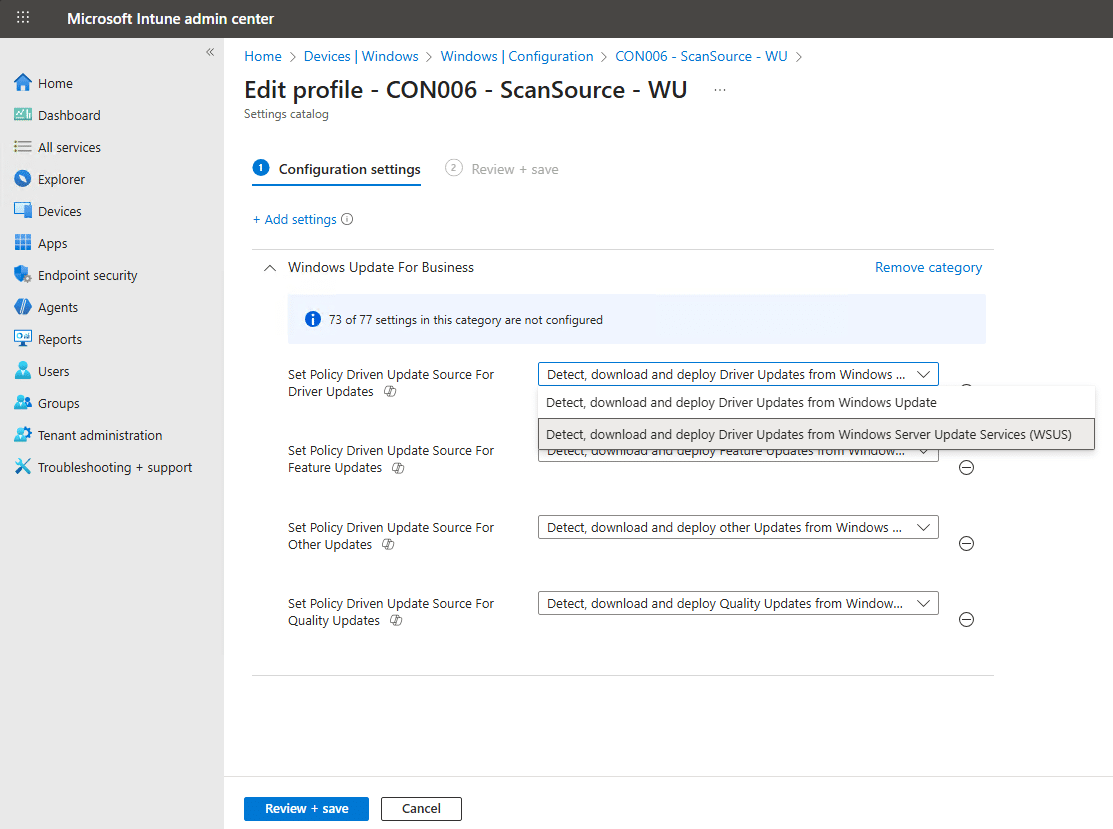
We can see the policy applied on a device at HKEY_LOCAL_MACHINE\SOFTWARE\Microsoft\PolicyManager\current\device\Update

But when I initiated update scans through ccmexec or the settings UI in the lab, I could never see this policy being read.

Group Policy
The old skool way…


However you set policy, 1 indicates the source for a specific class is set to WSUS and 0 indicates the class is set to Windows Update.
Testing Scan Source Impact
This section gets to the point of the entire exercise. i.e. what actually happens when scan source is configured, changed, or left unmanaged. I tested scan source enforcement, for co-managed devices, via Group Policy, Intune, and no policy at all, then triggered update scans in different ways to see where the device really reached out to.
Specifically, I looked at whether scan source behaved as expected when a scan was initiated by ConfigMgr (ccmexec), USOClient, Defender, or through “Check online for updates” in Settings. Did scan source consistently govern which services were queried? Did scan source policy set in Intune Settings Catalog have any measurable effect? And did different scan initiation methods change the outcome?
Here are a couple of examples of the Windows Update Agent talking to differnet endpoints depending on how scan source classes were configured and where the scan was initiated from. In each example ill share the WindowsUpdate.log snippet so you can see for yourself which service id’s are being called.
One intersting log line to consider in each test indicates which service the Windows Update Agent is being asked to query based on the function GetFederatedServiceIds().
Test 1: Scan Source = 1
Test Conditions:
Device: Comanaged
Scan Source set to: 1
Policy set by: Intune Settings Catalog
Check for Updates kicked off from: ConfigMgr control panel applet
2025/12/06 20:18:50.0101552 2772  8664  Agent           CAgentServiceManager::GetFederatedServiceIds(). ServiceId = 3DA21691-E39D-4DA6-8A4B-B43877BCB1B7
2025/12/06 20:18:50.0435499 688   9280  ComApi          * START *   Search ClientId = CcmExec, ServiceId = 3DA21691-E39D-4DA6-8A4B-B43877BCB1B7, Flags: 0X50 (cV = iZ/MOJR4BkCt7efK.1.0.0)
2025/12/06 20:18:50.0967601 2772  9008  Agent           ServiceID = {3DA21691-E39D-4DA6-8A4B-B43877BCB1B7} Managed (cV = iZ/MOJR4BkCt7efK.1.0.0.2)
2025/12/06 20:18:50.5565217 2772  9008  ProtocolTalker  ServiceId = {3DA21691-E39D-4DA6-8A4B-B43877BCB1B7}, Server URL = https://bb-cm1.byteben.com:8531/ClientWebService/client.asmx (cV = iZ/MOJR4BkCt7efK.1.0.0.2.0)
2025/12/06 20:19:57.1667293 688   8836  ComApi          *RESUMED*   Search ClientId = CcmExec, ServiceId = 3DA21691-E39D-4DA6-8A4B-B43877BCB1B7 (cV = iZ/MOJR4BkCt7efK.1.0.0)
2025/12/06 20:19:57.2090512 688   8836  ComApi          * END *   Search ClientId = CcmExec, Updates found = 22, ServiceId = 3DA21691-E39D-4DA6-8A4B-B43877BCB1B7 (cV = iZ/MOJR4BkCt7efK.1.0.0)
Client IDs Involved: CcmExec (ConfigMgr)
GetFederatedServiceIds(): 3DA21691-E39D-4DA6-8A4B-B43877BCB1B7
Service ID’s Contacted: 3DA21691-E39D-4DA6-8A4B-B43877BCB1B7
Test 2: Scan Source = 1
Test Conditions:
Device: Comanaged
Scan Source set to: 1
Policy set by: Intune Settings Catalog
Check for Updates kicked off from: Windows Update UI
2025/12/06 20:23:40.9129574 2772  8664  Agent           CAgentServiceManager::GetFederatedServiceIds(). ServiceId = 00000000-0000-0000-0000-000000000000
2025/12/06 20:23:41.6029214 12720 1760  ComApi          * START *   Search ClientId = MoUpdateOrchestrator, ServiceId = 7971F918-A847-4430-9279-4A52D1EFE18D, Flags: 0X40010010 (cV = uQp1irP+ekaesySb.0.1.0.0)
2025/12/06 20:23:41.6250866 12720 1760  ComApi          * START *   Search ClientId = MoUpdateOrchestrator, ServiceId = 8B24B027-1DEE-BABB-9A95-3517DFB9C552, Flags: 0X40010010 (cV = uQp1irP+ekaesySb.0.1.1.0)
2025/12/06 20:23:41.6314675 2772  3420  Agent           ServiceID = {7971F918-A847-4430-9279-4A52D1EFE18D} Third party service (cV = uQp1irP+ekaesySb.0.1.0.0.2)
2025/12/06 20:23:41.6521211 12720 1760  ComApi          * START *   Search ClientId = MoUpdateOrchestrator, ServiceId = 3DA21691-E39D-4DA6-8A4B-B43877BCB1B7, Flags: 0X40010010 (cV = uQp1irP+ekaesySb.0.1.2.0)
2025/12/06 20:23:41.8441573 2772  3420  ProtocolTalker  ServiceId = {7971F918-A847-4430-9279-4A52D1EFE18D}, Server URL = https://fe2cr.update.microsoft.com/v6/ClientWebService/client.asmx (cV = uQp1irP+ekaesySb.0.1.0.0.2.0)
2025/12/06 20:23:46.1064095 2772  3420  ProtocolTalker  ServiceId = {7971F918-A847-4430-9279-4A52D1EFE18D}, Server URL = https://fe2cr.update.microsoft.com/v6/ClientWebService/client.asmx (cV = uQp1irP+ekaesySb.0.1.0.0.2.2)
2025/12/06 20:23:46.4377849 2772  9224  Agent           ServiceID = {8B24B027-1DEE-BABB-9A95-3517DFB9C552} Third party service (cV = uQp1irP+ekaesySb.0.1.1.0.2)
2025/12/06 20:23:46.4475409 12720 8240  ComApi          *RESUMED*   Search ClientId = MoUpdateOrchestrator, ServiceId = 7971F918-A847-4430-9279-4A52D1EFE18D (cV = uQp1irP+ekaesySb.0.1.0.0)
2025/12/06 20:23:46.4897484 12720 8240  ComApi          * END *   Search ClientId = MoUpdateOrchestrator, Updates found = 1, ServiceId = 7971F918-A847-4430-9279-4A52D1EFE18D (cV = uQp1irP+ekaesySb.0.1.0.0)
2025/12/06 20:23:47.1078713 2772  9224  ProtocolTalker  ServiceId = {8B24B027-1DEE-BABB-9A95-3517DFB9C552}, Server URL = https://fe3cr.delivery.mp.microsoft.com/ClientWebService/client.asmx (cV = uQp1irP+ekaesySb.0.1.1.0.2.0)
2025/12/06 20:23:48.7704541 2772  11568 Agent           ServiceID = {3DA21691-E39D-4DA6-8A4B-B43877BCB1B7} Managed (cV = uQp1irP+ekaesySb.0.1.2.0.2)
2025/12/06 20:23:48.7771373 12720 8240  ComApi          *RESUMED*   Search ClientId = MoUpdateOrchestrator, ServiceId = 8B24B027-1DEE-BABB-9A95-3517DFB9C552 (cV = uQp1irP+ekaesySb.0.1.1.0)
2025/12/06 20:23:48.7774346 12720 8240  ComApi          * END *   Search ClientId = MoUpdateOrchestrator, Updates found = 0, ServiceId = 8B24B027-1DEE-BABB-9A95-3517DFB9C552 (cV = uQp1irP+ekaesySb.0.1.1.0)
2025/12/06 20:23:49.0028208 2772  11568 ProtocolTalker  ServiceId = {3DA21691-E39D-4DA6-8A4B-B43877BCB1B7}, Server URL = https://bb-cm1.byteben.com:8531/ClientWebService/client.asmx (cV = uQp1irP+ekaesySb.0.1.2.0.2.0)
2025/12/06 20:24:42.1491943 12720 5244  ComApi          *RESUMED*   Search ClientId = MoUpdateOrchestrator, ServiceId = 3DA21691-E39D-4DA6-8A4B-B43877BCB1B7 (cV = uQp1irP+ekaesySb.0.1.2.0)
2025/12/06 20:24:42.1492792 12720 5244  ComApi          * END *   Search ClientId = MoUpdateOrchestrator, Updates found = 0, ServiceId = 3DA21691-E39D-4DA6-8A4B-B43877BCB1B7 (cV = uQp1irP+ekaesySb.0.1.2.0)
2025/12/06 20:24:42.5322927 12720 9236  ComApi          ServiceID = {7971F918-A847-4430-9279-4A52D1EFE18D} Third party service, Final SessionData = (null)
2025/12/06 20:24:42.6559444 2772  8048  DownloadManager Priority = 2, NetworkCostPolicy = 0, Interactive = Yes, Download on Battery = Yes, Bypass Regulation = Yes, Owner is system = Yes, Proxy session id = 2, Download Type = 0, ServiceId = 7971F918-A847-4430-9279-4A52D1EFE18D, IsSerialized = No.
2025/12/06 20:24:43.3963172 12720 5180  ComApi          ServiceID = {7971F918-A847-4430-9279-4A52D1EFE18D} Third party service, Final SessionData = (null)
We didnt change any settings but this time we kicked the scan off from the Windows Update UI from the Settings app. ClientId = MoUpdateOrchestrator clearly indicates its not ConfigMgr doing anything now and we can see multiple services being contacted but more improtantly, Windows Update services…not soley WSUS.
Client IDs Involved: MoUpdateOrchestrator
GetFederatedServiceIds(): 00000000-0000-0000-0000-000000000000
Service ID’s Contacted: 7971F918-A847-4430-9279-4A52D1EFE18D, 3DA21691-E39D-4DA6-8A4B-B43877BCB1B7, 8B24B027-1DEE-BABB-9A95-3517DFB9C552
Test 3: Scan Source = 1
Test Conditions:
Device: Comanaged
Scan Source set to: 1
Policy set by: Intune Settings Catalog
Check for Updates kicked off from: Windows Update UI (Check Online option)
2025/12/06 20:27:06.7348653 2772  8664  Agent           CAgentServiceManager::GetFederatedServiceIds(). ServiceId = 7971F918-A847-4430-9279-4A52D1EFE18D
2025/12/06 20:27:06.9321379 12720 10592 ComApi          * START *   Search ClientId = MoUpdateOrchestrator, ServiceId = 7971F918-A847-4430-9279-4A52D1EFE18D, Flags: 0X40010010 (cV = a4uFAMho7EmkVspc.0.1.0.0)
2025/12/06 20:27:06.9571798 12720 10592 ComApi          * START *   Search ClientId = MoUpdateOrchestrator, ServiceId = 8B24B027-1DEE-BABB-9A95-3517DFB9C552, Flags: 0X40010010 (cV = a4uFAMho7EmkVspc.0.1.1.0)
2025/12/06 20:27:06.9670819 2772  9816  Agent           ServiceID = {7971F918-A847-4430-9279-4A52D1EFE18D} Third party service (cV = a4uFAMho7EmkVspc.0.1.0.0.2)
2025/12/06 20:27:06.9837469 12720 10592 ComApi          * START *   Search ClientId = MoUpdateOrchestrator, ServiceId = 3DA21691-E39D-4DA6-8A4B-B43877BCB1B7, Flags: 0X40010010 (cV = a4uFAMho7EmkVspc.0.1.2.0)
2025/12/06 20:27:07.1313514 2772  9816  ProtocolTalker  ServiceId = {7971F918-A847-4430-9279-4A52D1EFE18D}, Server URL = https://fe2cr.update.microsoft.com/v6/ClientWebService/client.asmx (cV = a4uFAMho7EmkVspc.0.1.0.0.2.0)
2025/12/06 20:27:26.4735608 2772  9816  ProtocolTalker  ServiceId = {7971F918-A847-4430-9279-4A52D1EFE18D}, Server URL = https://fe2cr.update.microsoft.com/v6/ClientWebService/client.asmx (cV = a4uFAMho7EmkVspc.0.1.0.0.2.1)
2025/12/06 20:27:27.4719146 2772  10284 Agent           ServiceID = {8B24B027-1DEE-BABB-9A95-3517DFB9C552} Third party service (cV = a4uFAMho7EmkVspc.0.1.1.0.2)
2025/12/06 20:27:27.4795231 12720 9176  ComApi          *RESUMED*   Search ClientId = MoUpdateOrchestrator, ServiceId = 7971F918-A847-4430-9279-4A52D1EFE18D (cV = a4uFAMho7EmkVspc.0.1.0.0)
2025/12/06 20:27:27.4797884 12720 9176  ComApi          * END *   Search ClientId = MoUpdateOrchestrator, Updates found = 0, ServiceId = 7971F918-A847-4430-9279-4A52D1EFE18D (cV = a4uFAMho7EmkVspc.0.1.0.0)
2025/12/06 20:27:27.7387000 2772  10284 ProtocolTalker  ServiceId = {8B24B027-1DEE-BABB-9A95-3517DFB9C552}, Server URL = https://fe3cr.delivery.mp.microsoft.com/ClientWebService/client.asmx (cV = a4uFAMho7EmkVspc.0.1.1.0.2.0)
2025/12/06 20:27:29.4374743 2772  11732 Agent           ServiceID = {3DA21691-E39D-4DA6-8A4B-B43877BCB1B7} Managed (cV = a4uFAMho7EmkVspc.0.1.2.0.2)
2025/12/06 20:27:29.4473586 12720 9176  ComApi          *RESUMED*   Search ClientId = MoUpdateOrchestrator, ServiceId = 8B24B027-1DEE-BABB-9A95-3517DFB9C552 (cV = a4uFAMho7EmkVspc.0.1.1.0)
2025/12/06 20:27:29.4476950 12720 9176  ComApi          * END *   Search ClientId = MoUpdateOrchestrator, Updates found = 0, ServiceId = 8B24B027-1DEE-BABB-9A95-3517DFB9C552 (cV = a4uFAMho7EmkVspc.0.1.1.0)
2025/12/06 20:27:29.6506670 2772  11732 ProtocolTalker  ServiceId = {3DA21691-E39D-4DA6-8A4B-B43877BCB1B7}, Server URL = https://bb-cm1.byteben.com:8531/ClientWebService/client.asmx (cV = a4uFAMho7EmkVspc.0.1.2.0.2.0)
2025/12/06 20:28:18.4020717 12720 9632  ComApi          *RESUMED*   Search ClientId = MoUpdateOrchestrator, ServiceId = 3DA21691-E39D-4DA6-8A4B-B43877BCB1B7 (cV = a4uFAMho7EmkVspc.0.1.2.0)
2025/12/06 20:28:18.4021471 12720 9632  ComApi          * END *   Search ClientId = MoUpdateOrchestrator, Updates found = 0, ServiceId = 3DA21691-E39D-4DA6-8A4B-B43877BCB1B7 (cV = a4uFAMho7EmkVspc.0.1.2.0)
Client IDs Involved: MoUpdateOrchestrator
GetFederatedServiceIds(): 7971F918-A847-4430-9279-4A52D1EFE18D
Service ID’s Contacted: 7971F918-A847-4430-9279-4A52D1EFE18D, 3DA21691-E39D-4DA6-8A4B-B43877BCB1B7, 8B24B027-1DEE-BABB-9A95-3517DFB9C552
Test 4: Scan Source = 0
Test Conditions:
Device: Comanaged
Scan Source set to: 0
Policy set by: Intune Settings Catalog
Check for Updates kicked off from: ConfigMgr control panel applet
2025/12/06 16:37:04.8563125 2544  10204 Agent           CAgentServiceManager::GetFederatedServiceIds(). ServiceId = 3DA21691-E39D-4DA6-8A4B-B43877BCB1B7
2025/12/06 16:37:04.9498098 3832  684   ComApi          * START *   Search ClientId = CcmExec, ServiceId = 3DA21691-E39D-4DA6-8A4B-B43877BCB1B7, Flags: 0X50 (cV = maFMzGmjLki3peAH.5.0.0)
2025/12/06 16:37:05.0396198 2544  5384  Agent           ServiceID = {3DA21691-E39D-4DA6-8A4B-B43877BCB1B7} Managed (cV = maFMzGmjLki3peAH.5.0.0.2)
2025/12/06 16:37:05.7320588 2544  5384  ProtocolTalker  ServiceId = {3DA21691-E39D-4DA6-8A4B-B43877BCB1B7}, Server URL = https://bb-cm1.byteben.com:8531/ClientWebService/client.asmx (cV = maFMzGmjLki3peAH.5.0.0.2.0)
2025/12/06 16:38:16.0024220 3832  1600  ComApi          *RESUMED*   Search ClientId = CcmExec, ServiceId = 3DA21691-E39D-4DA6-8A4B-B43877BCB1B7 (cV = maFMzGmjLki3peAH.5.0.0)
2025/12/06 16:38:16.0324404 3832  1600  ComApi          * END *   Search ClientId = CcmExec, Updates found = 22, ServiceId = 3DA21691-E39D-4DA6-8A4B-B43877BCB1B7 (cV = maFMzGmjLki3peAH.5.0.0)
2025/12/06 16:39:48.1341521 2544  10204 Agent
Client IDs Involved: CcmExec (ConfigMgr)
GetFederatedServiceIds(): 3DA21691-E39D-4DA6-8A4B-B43877BCB1B7
Service ID’s Contacted: 3DA21691-E39D-4DA6-8A4B-B43877BCB1B7
Test 5: Scan Source = 0
Test Conditions:
Device: Comanaged
Scan Source set to: 0
Policy set by: Intune Settings Catalog
Check for Updates kicked off from: Windows Update UI
2025/12/06 16:43:58.7622130 2544  10204 Agent           CAgentServiceManager::GetFederatedServiceIds(). ServiceId = 00000000-0000-0000-0000-000000000000
2025/12/06 16:43:58.9862585 5800  11116 ComApi          * START *   Search ClientId = MoUpdateOrchestrator, ServiceId = 7971F918-A847-4430-9279-4A52D1EFE18D, Flags: 0X40010010 (cV = 6FwM1rOHz0u4hTaH.0.1.0.0)
2025/12/06 16:43:59.0479283 5800  11116 ComApi          * START *   Search ClientId = MoUpdateOrchestrator, ServiceId = 8B24B027-1DEE-BABB-9A95-3517DFB9C552, Flags: 0X40010010 (cV = 6FwM1rOHz0u4hTaH.0.1.1.0)
2025/12/06 16:43:59.0903352 2544  8308  Agent           ServiceID = {7971F918-A847-4430-9279-4A52D1EFE18D} Third party service (cV = 6FwM1rOHz0u4hTaH.0.1.0.0.2)
2025/12/06 16:43:59.1238952 5800  11116 ComApi          * START *   Search ClientId = MoUpdateOrchestrator, ServiceId = 3DA21691-E39D-4DA6-8A4B-B43877BCB1B7, Flags: 0X40010010 (cV = 6FwM1rOHz0u4hTaH.0.1.2.0)
2025/12/06 16:43:59.3958881 2544  8308  ProtocolTalker  ServiceId = {7971F918-A847-4430-9279-4A52D1EFE18D}, Server URL = https://fe2cr.update.microsoft.com/v6/ClientWebService/client.asmx (cV = 6FwM1rOHz0u4hTaH.0.1.0.0.2.0)
2025/12/06 16:44:05.4737058 2544  8308  ProtocolTalker  ServiceId = {7971F918-A847-4430-9279-4A52D1EFE18D}, Server URL = https://fe2cr.update.microsoft.com/v6/ClientWebService/client.asmx (cV = 6FwM1rOHz0u4hTaH.0.1.0.0.2.2)
2025/12/06 16:44:05.7768539 5800  6408  ComApi          *RESUMED*   Search ClientId = MoUpdateOrchestrator, ServiceId = 7971F918-A847-4430-9279-4A52D1EFE18D (cV = 6FwM1rOHz0u4hTaH.0.1.0.0)
2025/12/06 16:44:05.7825454 2544  4396  Agent           ServiceID = {8B24B027-1DEE-BABB-9A95-3517DFB9C552} Third party service (cV = 6FwM1rOHz0u4hTaH.0.1.1.0.2)
2025/12/06 16:44:05.8530631 5800  6408  ComApi          * END *   Search ClientId = MoUpdateOrchestrator, Updates found = 1, ServiceId = 7971F918-A847-4430-9279-4A52D1EFE18D (cV = 6FwM1rOHz0u4hTaH.0.1.0.0)
2025/12/06 16:44:06.6038229 2544  4396  ProtocolTalker  ServiceId = {8B24B027-1DEE-BABB-9A95-3517DFB9C552}, Server URL = https://fe3cr.delivery.mp.microsoft.com/ClientWebService/client.asmx (cV = 6FwM1rOHz0u4hTaH.0.1.1.0.2.0)
2025/12/06 16:44:07.6371422 2544  7452  Agent           ServiceID = {3DA21691-E39D-4DA6-8A4B-B43877BCB1B7} Managed (cV = 6FwM1rOHz0u4hTaH.0.1.2.0.2)
2025/12/06 16:44:07.6372512 5800  6408  ComApi          *RESUMED*   Search ClientId = MoUpdateOrchestrator, ServiceId = 8B24B027-1DEE-BABB-9A95-3517DFB9C552 (cV = 6FwM1rOHz0u4hTaH.0.1.1.0)
2025/12/06 16:44:07.6373469 5800  6408  ComApi          * END *   Search ClientId = MoUpdateOrchestrator, Updates found = 0, ServiceId = 8B24B027-1DEE-BABB-9A95-3517DFB9C552 (cV = 6FwM1rOHz0u4hTaH.0.1.1.0)
2025/12/06 16:44:08.0165096 2544  7452  ProtocolTalker  ServiceId = {3DA21691-E39D-4DA6-8A4B-B43877BCB1B7}, Server URL = https://bb-cm1.byteben.com:8531/ClientWebService/client.asmx (cV = 6FwM1rOHz0u4hTaH.0.1.2.0.2.0)
2025/12/06 16:45:09.2489430 5800  13544 ComApi          *RESUMED*   Search ClientId = MoUpdateOrchestrator, ServiceId = 3DA21691-E39D-4DA6-8A4B-B43877BCB1B7 (cV = 6FwM1rOHz0u4hTaH.0.1.2.0)
2025/12/06 16:45:09.2491522 5800  13544 ComApi          * END *   Search ClientId = MoUpdateOrchestrator, Updates found = 0, ServiceId = 3DA21691-E39D-4DA6-8A4B-B43877BCB1B7 (cV = 6FwM1rOHz0u4hTaH.0.1.2.0)
2025/12/06 16:45:09.9815220 5800  2784  ComApi          ServiceID = {7971F918-A847-4430-9279-4A52D1EFE18D} Third party service, Final SessionData = (null)
2025/12/06 16:45:10.0177625 2544  1864  DownloadManager Priority = 2, NetworkCostPolicy = 0, Interactive = Yes, Download on Battery = Yes, Bypass Regulation = Yes, Owner is system = Yes, Proxy session id = 2, Download Type = 0, ServiceId = 7971F918-A847-4430-9279-4A52D1EFE18D, IsSerialized = No.
2025/12/06 16:45:11.2120767 5800  2668  ComApi          ServiceID = {7971F918-A847-4430-9279-4A52D1EFE18D} Third party service, Final SessionData = (null)
Client IDs Involved: MoUpdateOrchestrator
GetFederatedServiceIds(): 00000000-0000-0000-0000-000000000000
Service ID’s Contacted: 7971F918-A847-4430-9279-4A52D1EFE18D, 3DA21691-E39D-4DA6-8A4B-B43877BCB1B7, 8B24B027-1DEE-BABB-9A95-3517DFB9C552
Test 6: Scan Source = 0
Test Conditions:
Device: Comanaged
Scan Source set to: 0
Policy set by: Intune Settings Catalog
Check for Updates kicked off from: Windows Update UI (Check Online option)
2025/12/06 16:48:03.8035575 2544  10204 Agent           CAgentServiceManager::GetFederatedServiceIds(). ServiceId = 7971F918-A847-4430-9279-4A52D1EFE18D
2025/12/06 16:48:04.0076728 5800  10276 ComApi          * START *   Search ClientId = MoUpdateOrchestrator, ServiceId = 7971F918-A847-4430-9279-4A52D1EFE18D, Flags: 0X40010010 (cV = kDBJjvJfC0WVnHNu.0.1.0.0)
2025/12/06 16:48:04.0713931 5800  10276 ComApi          * START *   Search ClientId = MoUpdateOrchestrator, ServiceId = 8B24B027-1DEE-BABB-9A95-3517DFB9C552, Flags: 0X40010010 (cV = kDBJjvJfC0WVnHNu.0.1.1.0)
2025/12/06 16:48:04.1040347 2544  13536 Agent           ServiceID = {7971F918-A847-4430-9279-4A52D1EFE18D} Third party service (cV = kDBJjvJfC0WVnHNu.0.1.0.0.2)
2025/12/06 16:48:04.1507802 5800  10276 ComApi          * START *   Search ClientId = MoUpdateOrchestrator, ServiceId = 3DA21691-E39D-4DA6-8A4B-B43877BCB1B7, Flags: 0X40010010 (cV = kDBJjvJfC0WVnHNu.0.1.2.0)
2025/12/06 16:48:04.4058878 2544  13536 ProtocolTalker  ServiceId = {7971F918-A847-4430-9279-4A52D1EFE18D}, Server URL = https://fe2cr.update.microsoft.com/v6/ClientWebService/client.asmx (cV = kDBJjvJfC0WVnHNu.0.1.0.0.2.0)
2025/12/06 16:48:18.3172713 2544  13536 ProtocolTalker  ServiceId = {7971F918-A847-4430-9279-4A52D1EFE18D}, Server URL = https://fe2cr.update.microsoft.com/v6/ClientWebService/client.asmx (cV = kDBJjvJfC0WVnHNu.0.1.0.0.2.1)
2025/12/06 16:48:19.5070902 5800  5600  ComApi          *RESUMED*   Search ClientId = MoUpdateOrchestrator, ServiceId = 7971F918-A847-4430-9279-4A52D1EFE18D (cV = kDBJjvJfC0WVnHNu.0.1.0.0)
2025/12/06 16:48:19.5072808 5800  5600  ComApi          * END *   Search ClientId = MoUpdateOrchestrator, Updates found = 0, ServiceId = 7971F918-A847-4430-9279-4A52D1EFE18D (cV = kDBJjvJfC0WVnHNu.0.1.0.0)
2025/12/06 16:48:19.5108538 2544  7760  Agent           ServiceID = {8B24B027-1DEE-BABB-9A95-3517DFB9C552} Third party service (cV = kDBJjvJfC0WVnHNu.0.1.1.0.2)
2025/12/06 16:48:20.0425170 2544  7760  ProtocolTalker  ServiceId = {8B24B027-1DEE-BABB-9A95-3517DFB9C552}, Server URL = https://fe3cr.delivery.mp.microsoft.com/ClientWebService/client.asmx (cV = kDBJjvJfC0WVnHNu.0.1.1.0.2.0)
2025/12/06 16:48:21.0530043 5800  5600  ComApi          *RESUMED*   Search ClientId = MoUpdateOrchestrator, ServiceId = 8B24B027-1DEE-BABB-9A95-3517DFB9C552 (cV = kDBJjvJfC0WVnHNu.0.1.1.0)
2025/12/06 16:48:21.0532124 5800  5600  ComApi          * END *   Search ClientId = MoUpdateOrchestrator, Updates found = 0, ServiceId = 8B24B027-1DEE-BABB-9A95-3517DFB9C552 (cV = kDBJjvJfC0WVnHNu.0.1.1.0)
2025/12/06 16:48:21.0601012 2544  10656 Agent           ServiceID = {3DA21691-E39D-4DA6-8A4B-B43877BCB1B7} Managed (cV = kDBJjvJfC0WVnHNu.0.1.2.0.2)
2025/12/06 16:48:21.4463379 2544  10656 ProtocolTalker  ServiceId = {3DA21691-E39D-4DA6-8A4B-B43877BCB1B7}, Server URL = https://bb-cm1.byteben.com:8531/ClientWebService/client.asmx (cV = kDBJjvJfC0WVnHNu.0.1.2.0.2.0)
Client IDs Involved: MoUpdateOrchestrator
GetFederatedServiceIds(): 7971F918-A847-4430-9279-4A52D1EFE18D
Service ID’s Contacted: 7971F918-A847-4430-9279-4A52D1EFE18D, 3DA21691-E39D-4DA6-8A4B-B43877BCB1B7, 8B24B027-1DEE-BABB-9A95-3517DFB9C552
Test 7: Scan Source = Not Set
Test Conditions:
Device: Comanaged
Scan Source set to: N/A
Policy set by: IN/A
Check for Updates kicked off from: ConfigMgr control panel applet
CAgentServiceManager::GetFederatedServiceIds(). ServiceId = 3DA21691-E39D-4DA6-8A4B-B43877BCB1B7
2025/12/06 20:39:26.3370385 10860 1504  ComApi          * START *   Search ClientId = CcmExec, ServiceId = 3DA21691-E39D-4DA6-8A4B-B43877BCB1B7, Flags: 0X50 (cV = MHleaRc2b0ux+cb8.1.0.0)
2025/12/06 20:39:26.3804308 5648  6300  Agent           ServiceID = {3DA21691-E39D-4DA6-8A4B-B43877BCB1B7} Managed (cV = MHleaRc2b0ux+cb8.1.0.0.2)
2025/12/06 20:39:26.8980445 5648  6300  ProtocolTalker  ServiceId = {3DA21691-E39D-4DA6-8A4B-B43877BCB1B7}, Server URL = https://bb-cm1.byteben.com:8531/ClientWebService/client.asmx (cV = MHleaRc2b0ux+cb8.1.0.0.2.0)
2025/12/06 20:40:40.0524709 10860 4528  ComApi          *RESUMED*   Search ClientId = CcmExec, ServiceId = 3DA21691-E39D-4DA6-8A4B-B43877BCB1B7 (cV = MHleaRc2b0ux+cb8.1.0.0)
2025/12/06 20:40:40.0973124 10860 4528  ComApi          * END *   Search ClientId = CcmExec, Updates found = 35, ServiceId = 3DA21691-E39D-4DA6-8A4B-B43877BCB1B7 (cV = MHleaRc2b0ux+cb8.1.0.0)
Client IDs Involved: CcmExec (ConfigMgr)
GetFederatedServiceIds(): 3DA21691-E39D-4DA6-8A4B-B43877BCB1B7
Service ID’s Contacted: 3DA21691-E39D-4DA6-8A4B-B43877BCB1B7
Test 8: Scan Source = Not Set
Test Conditions:
Device: Comanaged
Scan Source set to: N/A
Policy set by: N/A
Check for Updates kicked off from: Windows Update UI
2025/12/06 20:42:18.5476015 5648  3560  Agent           CAgentServiceManager::GetFederatedServiceIds(). ServiceId = 00000000-0000-0000-0000-000000000000
2025/12/06 20:42:18.7436587 1328  10388 ComApi          * START *   Search ClientId = MoUpdateOrchestrator, ServiceId = 7971F918-A847-4430-9279-4A52D1EFE18D, Flags: 0X40010010 (cV = cF4TllijQUmYh4bi.0.1.0.0)
2025/12/06 20:42:18.7685909 1328  10388 ComApi          * START *   Search ClientId = MoUpdateOrchestrator, ServiceId = 8B24B027-1DEE-BABB-9A95-3517DFB9C552, Flags: 0X40010010 (cV = cF4TllijQUmYh4bi.0.1.1.0)
2025/12/06 20:42:18.7843600 5648  4100  Agent           ServiceID = {7971F918-A847-4430-9279-4A52D1EFE18D} Third party service (cV = cF4TllijQUmYh4bi.0.1.0.0.2)
2025/12/06 20:42:18.7927313 1328  10388 ComApi          * START *   Search ClientId = MoUpdateOrchestrator, ServiceId = 3DA21691-E39D-4DA6-8A4B-B43877BCB1B7, Flags: 0X40010010 (cV = cF4TllijQUmYh4bi.0.1.2.0)
2025/12/06 20:42:18.9696993 5648  4100  ProtocolTalker  ServiceId = {7971F918-A847-4430-9279-4A52D1EFE18D}, Server URL = https://fe2cr.update.microsoft.com/v6/ClientWebService/client.asmx (cV = cF4TllijQUmYh4bi.0.1.0.0.2.0)
2025/12/06 20:42:21.8905215 5648  13160 Agent           ServiceID = {8B24B027-1DEE-BABB-9A95-3517DFB9C552} Third party service (cV = cF4TllijQUmYh4bi.0.1.1.0.2)
2025/12/06 20:42:21.8985860 1328  2796  ComApi          *RESUMED*   Search ClientId = MoUpdateOrchestrator, ServiceId = 7971F918-A847-4430-9279-4A52D1EFE18D (cV = cF4TllijQUmYh4bi.0.1.0.0)
2025/12/06 20:42:21.8988417 1328  2796  ComApi          * END *   Search ClientId = MoUpdateOrchestrator, Updates found = 0, ServiceId = 7971F918-A847-4430-9279-4A52D1EFE18D (cV = cF4TllijQUmYh4bi.0.1.0.0)
2025/12/06 20:42:22.2225888 5648  13160 ProtocolTalker  ServiceId = {8B24B027-1DEE-BABB-9A95-3517DFB9C552}, Server URL = https://fe3cr.delivery.mp.microsoft.com/ClientWebService/client.asmx (cV = cF4TllijQUmYh4bi.0.1.1.0.2.0)
2025/12/06 20:42:30.2291792 1328  2796  ComApi          *RESUMED*   Search ClientId = MoUpdateOrchestrator, ServiceId = 8B24B027-1DEE-BABB-9A95-3517DFB9C552 (cV = cF4TllijQUmYh4bi.0.1.1.0)
2025/12/06 20:42:30.2294259 1328  2796  ComApi          * END *   Search ClientId = MoUpdateOrchestrator, Updates found = 0, ServiceId = 8B24B027-1DEE-BABB-9A95-3517DFB9C552 (cV = cF4TllijQUmYh4bi.0.1.1.0)
2025/12/06 20:42:30.2335599 5648  2960  Agent           ServiceID = {3DA21691-E39D-4DA6-8A4B-B43877BCB1B7} Managed (cV = cF4TllijQUmYh4bi.0.1.2.0.2)
2025/12/06 20:42:30.4541774 5648  2960  ProtocolTalker  ServiceId = {3DA21691-E39D-4DA6-8A4B-B43877BCB1B7}, Server URL = https://bb-cm1.byteben.com:8531/ClientWebService/client.asmx (cV = cF4TllijQUmYh4bi.0.1.2.0.2.0)
2025/12/06 20:43:18.0369578 1328  2796  ComApi          *RESUMED*   Search ClientId = MoUpdateOrchestrator, ServiceId = 3DA21691-E39D-4DA6-8A4B-B43877BCB1B7 (cV = cF4TllijQUmYh4bi.0.1.2.0)
2025/12/06 20:43:18.0373050 1328  2796  ComApi          * END *   Search ClientId = MoUpdateOrchestrator, Updates found = 0, ServiceId = 3DA21691-E39D-4DA6-8A4B-B43877BCB1B7 (cV = cF4TllijQUmYh4bi.0.1.2.0)
Client IDs Involved: MoUpdateOrchestrator
GetFederatedServiceIds(): 00000000-0000-0000-0000-000000000000
Service ID’s Contacted: 7971F918-A847-4430-9279-4A52D1EFE18D, 3DA21691-E39D-4DA6-8A4B-B43877BCB1B7, 8B24B027-1DEE-BABB-9A95-3517DFB9C552
Test 9: Scan Source Not Set
Test Conditions:
Device: Comanaged
Scan Source set to: N/A
Policy set by: N/A
Check for Updates kicked off from: Windows Update UI (Check Online option)
2025/12/06 20:44:21.9454020 5648  3560  Agent           CAgentServiceManager::GetFederatedServiceIds(). ServiceId = 7971F918-A847-4430-9279-4A52D1EFE18D
2025/12/06 20:44:22.1048102 1328  10124 ComApi          * START *   Search ClientId = MoUpdateOrchestrator, ServiceId = 7971F918-A847-4430-9279-4A52D1EFE18D, Flags: 0X40010010 (cV = DTvb4Fh3I0G6/4A+.0.1.0.0)
2025/12/06 20:44:22.1291434 1328  10124 ComApi          * START *   Search ClientId = MoUpdateOrchestrator, ServiceId = 8B24B027-1DEE-BABB-9A95-3517DFB9C552, Flags: 0X40010010 (cV = DTvb4Fh3I0G6/4A+.0.1.1.0)
2025/12/06 20:44:22.1424990 5648  8872  Agent           ServiceID = {7971F918-A847-4430-9279-4A52D1EFE18D} Third party service (cV = DTvb4Fh3I0G6/4A+.0.1.0.0.2)
2025/12/06 20:44:22.1518626 1328  10124 ComApi          * START *   Search ClientId = MoUpdateOrchestrator, ServiceId = 3DA21691-E39D-4DA6-8A4B-B43877BCB1B7, Flags: 0X40010010 (cV = DTvb4Fh3I0G6/4A+.0.1.2.0)
2025/12/06 20:44:22.2972646 5648  8872  ProtocolTalker  ServiceId = {7971F918-A847-4430-9279-4A52D1EFE18D}, Server URL = https://fe2cr.update.microsoft.com/v6/ClientWebService/client.asmx (cV = DTvb4Fh3I0G6/4A+.0.1.0.0.2.0)
2025/12/06 20:44:33.1179934 1328  3700  ComApi          *RESUMED*   Search ClientId = MoUpdateOrchestrator, ServiceId = 7971F918-A847-4430-9279-4A52D1EFE18D (cV = DTvb4Fh3I0G6/4A+.0.1.0.0)
2025/12/06 20:44:33.1183012 1328  3700  ComApi          * END *   Search ClientId = MoUpdateOrchestrator, Updates found = 0, ServiceId = 7971F918-A847-4430-9279-4A52D1EFE18D (cV = DTvb4Fh3I0G6/4A+.0.1.0.0)
2025/12/06 20:44:33.1204726 5648  5112  Agent           ServiceID = {8B24B027-1DEE-BABB-9A95-3517DFB9C552} Third party service (cV = DTvb4Fh3I0G6/4A+.0.1.1.0.2)
2025/12/06 20:44:33.3716024 5648  5112  ProtocolTalker  ServiceId = {8B24B027-1DEE-BABB-9A95-3517DFB9C552}, Server URL = https://fe3cr.delivery.mp.microsoft.com/ClientWebService/client.asmx (cV = DTvb4Fh3I0G6/4A+.0.1.1.0.2.0)
2025/12/06 20:44:35.3791255 5648  12324 Agent           ServiceID = {3DA21691-E39D-4DA6-8A4B-B43877BCB1B7} Managed (cV = DTvb4Fh3I0G6/4A+.0.1.2.0.2)
2025/12/06 20:44:35.3825200 1328  3700  ComApi          *RESUMED*   Search ClientId = MoUpdateOrchestrator, ServiceId = 8B24B027-1DEE-BABB-9A95-3517DFB9C552 (cV = DTvb4Fh3I0G6/4A+.0.1.1.0)
2025/12/06 20:44:35.3827469 1328  3700  ComApi          * END *   Search ClientId = MoUpdateOrchestrator, Updates found = 0, ServiceId = 8B24B027-1DEE-BABB-9A95-3517DFB9C552 (cV = DTvb4Fh3I0G6/4A+.0.1.1.0)
Client IDs Involved: MoUpdateOrchestrator
GetFederatedServiceIds(): 7971F918-A847-4430-9279-4A52D1EFE18D
Service ID’s Contacted: 7971F918-A847-4430-9279-4A52D1EFE18D, 3DA21691-E39D-4DA6-8A4B-B43877BCB1B7, 8B24B027-1DEE-BABB-9A95-3517DFB9C552
Testing Results
The scan initiator mattered more than the scan source value
When a scan was initiated by ConfigMgr (ClientId = CcmExec), Windows Update Agent behaved like a managed scan every time. GetFederatedServiceIds() returned 3DA21691… and ProtocolTalker consistently showed traffic to the WSUS/SUP endpoint.
In other words, if CcmExec starts the scan, it tends to stay in the managed lane.
When a scan was initiated by the modern Windows Update stack (ClientId = MoUpdateOrchestrator), the behaviour flipped. GetFederatedServiceIds() was frequently 00000000… (unspecified/default), and the scan contacted multiple services in the same session, including Microsoft Update and flighting services, even when scan source was configured to force WSUS.
In other words: if MoUpdateOrchestrator starts the scan, you’re in the this federated-ish / multi-service lane, and scan source becomes, at best, one input among many.
That’s the first uncomfortable truth, scan source didn’t behave like a hard switch. It behaved like a preference that only some initiators honour, some of the time.
“Scan Source = 1” didn’t mean “WSUS only” in every scenario
This was the most surprising bit.
With scan source set to 1, I expected the Settings UI scan to be “WSUS or bust”. Instead, the MoUpdateOrchestrator scans contacted:
Microsoft Update (7971f918…)
Flighting (8b24b027…)
WSUS/SUP (3da21691…)
…and then returned results that didn’t clearly map to scan source must be forcing WSUS.
So while the device absolutely can talk to WSUS during a Settings UI scan, it also happily talks to Microsoft endpoints in the same interaction, which is exactly the opposite of what most people assume “scan source = WSUS” means.
The “Check online for updates” option is its own beast
When I used “Check online”, GetFederatedServiceIds() switched from 00000000… to 7971f918…, and the session strongly leaned into Microsoft Update behaviour.
That lines up with the user experience, “online” is Windows explicitly stepping outside the managed posture and doing what it can to find updates from Microsoft. In practical terms, it also means if you’re troubleshooting scan source and you click “Check online”, you’ve just changed the test somehwat.
Intune Settings Catalog policy didn’t show up where I expected it to
This is where my confidence dropped.
The policy was present in HKLM\SOFTWARE\Microsoft\PolicyManager\current\device\Update, but during the scans I was watching (CcmExec and MoUpdateOrchestrator), I couldn’t find convincing evidence in Procmon that either initiator was actually reading the scan source values from the PolicyManager location.
That doesn’t mean it never gets read. It does mean that in my testing, the enforcement path didn’t look like the WUA reads PolicyManager, so does scan source govern service choice at all?
If you’re relying on Settings Catalog alone, the practical takeaway is: don’t assume the presence of the CSP value means the scan engine is honouring it for all scan types. But perhaps someone with more knowledge can school me here and assure me that the CSP IS DOING SOMETHING.
Group Policy vs Intune wasn’t the differentiator either
When I repeated the tests using GPO instead of Settings Catalog, the ServiceId patterns were near-identical. The biggest behavioural difference wasn’t “GPO vs Intune”, it was the thing we already covered in the earlier dragon slayer section of this blog.
On co-managed devices where the Windows Update workload is moved, ConfigMgr repeatedly cleans scan source-related values before its own scan runs. So even if you believe scan source should matter, ConfigMgr can effectively reshuffle the deck on every scan cycle. That said, does it really matter if ScanSource doesnt appear to be doing anything?
The overall conclusion (so far)
If you were hoping this post would end with a single registry key and a victory lap, sorry. I didn’t land on a neat “set X and it’s fixed” moment. What I did get, though, was a much clearer way to investigate scan source behaviour without guessing which component is pulling the strings.
My working conclusions are:
- Scan source might not be the master switch people want it to be.
- Who starts the scan matters (human clicking “check for updates” vs ConfigMgr initiated scan) more than the scan source value. In my testing, CcmExec behaved like a managed WSUS scan, while MoUpdateOrchestrator behaved like a federated-ish scan that can involve multiple services.
- On co-managed devices, ConfigMgr remediation can interfere with scan source persistence. It repeatedly cleans and reshapes policy values before scans. Whether that ultimately matters depends on which scan initiator you care about, but it definitely makes “set policy and forget it” a shaky assumption.
- The Settings UI can and will involve Microsoft Update services even when scan source is set to WSUS. If your test method is “click Check for updates in Settings and watch where it goes”, don’t be surprised when you see Microsoft endpoints in the mix.
If there’s one practical recommendation I’d make before you start your own testing, it’s this:
Start with a clear deck. I saw GPCache being referenced in Procmon during scans, and it’s exactly the kind of thing that can muddy results when you’re flipping policy values back and forth. If you’re trying to prove cause and effect, cached policy state is not your friend. Clear the cache, reboot, then test.
One important caveat… my lab didn’t always have a “clean” scenario where updates were definitely applicable and should install, so some of what I’m inferring is based on service selection and network traffic, not a consistent “this update was offered by source X” validation every time. If I redo this, I’ll make sure each test run has a known-missing update (or a controlled baseline) so I can prove not just who was contacted, but who actually offered and satisfied the update.
Hopefully this blog still gives you something useful, a framework for your own investigations, the log lines to focus on. I also hope that it serves as a gentle reminder that with scan source, the most important question often isn’t “what policy did I set?”…it’s “who or what initiated the scan”.


 Simon Skotheimsvik
 Sandy Zeng



Add comment