

 Anders Ahl
Say hello to the future of Windows client management!
MMP-C + Microsoft Intune = streamlined, secure, and scalable.
Device management for Windows is undergoing a significant evolution. Microsoft’s Microsoft Management Platform – Cloud (MMP-C) (not to be confused with Microsoft Malware Protection Center) introduces a new paradigm for managing Windows clients in Intune that departs from the legacy OMA-DM approach. This article explores what MMP-C is, how it differs from the old OMA-DM stack, which Intune features already leverage MMP-C (such as Endpoint Privilege Management), and the benefits this new system brings for IT professionals and decision-makers.
Introduction to MMP-C (Microsoft Management Platform – Cloud)
MMP-C is a management platform that uses the Windows Declared Configuration (WinDC) protocol to manage devices in a desired-state, declarative model. In essence, MMP-C moves away from the traditional “request-apply-report” model and instead defines the intended state of a device once and continuously enforces it. This approach is conceptually similar to Desired State Configuration (DSC) in PowerShell, where a configuration is declared and the system autonomously ensures compliance.
Under the hood, when MMP-C is enabled on a device, the device establishes a second, linked Intune enrollment (often called Dual Enrollment or Linked Enrollment) in addition to the standard Intune MDM enrollment. The primary enrollment continues to handle traditional policies via OMA-DM, while the linked MMP-C enrollment uses the WinDC service to enforce policies in a continuous, state-based fashion. The core mechanism involves a Managed Object Format (MOF) document or declared configuration document sent to the device, which the Windows Declared Configuration service processes. The device then ensures all settings in that document remain in compliance, automatically correcting any drift from the desired state without waiting for the next policy check-in.
In summary, MMP-C is Intune’s modern management backbone for Windows, introducing a more resilient and efficient policy enforcement engine on the client side (Windows 10 and 11). It operates in parallel with (and eventually may supersede) the legacy management pipeline, bringing Intune’s Windows management closer to real-time compliance and cloud-driven immediacy.
How MMP-C Differs from the Traditional OMA-DM Stack
Before MMP-C, Windows Intune management relied on the OMA-DM (Open Mobile Alliance Device Management) protocol, where configurations are applied via OMA-URI-based CSPs (configuration service providers). This OMA-DM stack was originally designed with mobile devices in mind and functions in a cycle of syncs: the device periodically checks in, Intune pushes policy settings (in an XML format called SyncML), the device applies them, and then reports compliance back to Intune. Policy enforcement under OMA-DM is therefore interval-based and reactive – if a user or local change alters a setting between check-ins, Intune won’t catch it until the next scheduled sync, potentially leaving a compliance gap.
By contrast, MMP-C’s WinDC model is state-based and continuous. Instead of sending down individual “set” commands for each OMA-URI, Intune (via MMP-C) delivers a batched configuration document that describes the entire desired state. The Windows client’s MMP-C/WinDC agent takes responsibility for enforcing that state at all times: if any setting deviates from the desired state, the agent automatically re-applies the correct setting, often within minutes or even instantly depending on the scenario. The device no longer needs to constantly ask “what’s next?” – it knows what the target configuration is and maintains it autonomously, only reporting back to the cloud when there’s a drift or on a periodic schedule for confirmation.
Another key difference is performance and network efficiency. Under the OMA-DM approach, each policy or setting might involve separate transactions (get/set operations) and frequent polling of the Intune service. MMP-C, however, packages all necessary settings in a single payload and allows the client to process them asynchronously. This reduces chatter between device and cloud – Intune isn’t being pinged constantly for each individual setting, which lowers network overhead and server load. In fact, Microsoft describes WinDC as providing “all necessary settings in a single batch through a dedicated OMA-DM server”, making it highly efficient. The result is lower latency in applying policies and scaling to many devices more gracefully, since the heavy lifting is done client-side in one elegant swoop.
From a reliability and security standpoint, MMP-C’s on-device enforcement is more robust. The older OMA-DM client was “built for mobile phones a long time ago,” and is considered less reliable for modern Windows needs. The new WinDC stack is faster, more reliable, and more secure than the old mechanism. Because the device actively guards its state, compliance is maintained even between network check-ins, and critical settings (like security configurations) are less likely to drift out of compliance. Administrators gain confidence that, for example, if a user disables a required setting or an important certificate expires, the device will promptly self-correct or highlight the issue, rather than waiting hours for the next sync.
The table below summarizes the key differences between the traditional OMA-DM management stack and the new MMP-C/WinDC approach:
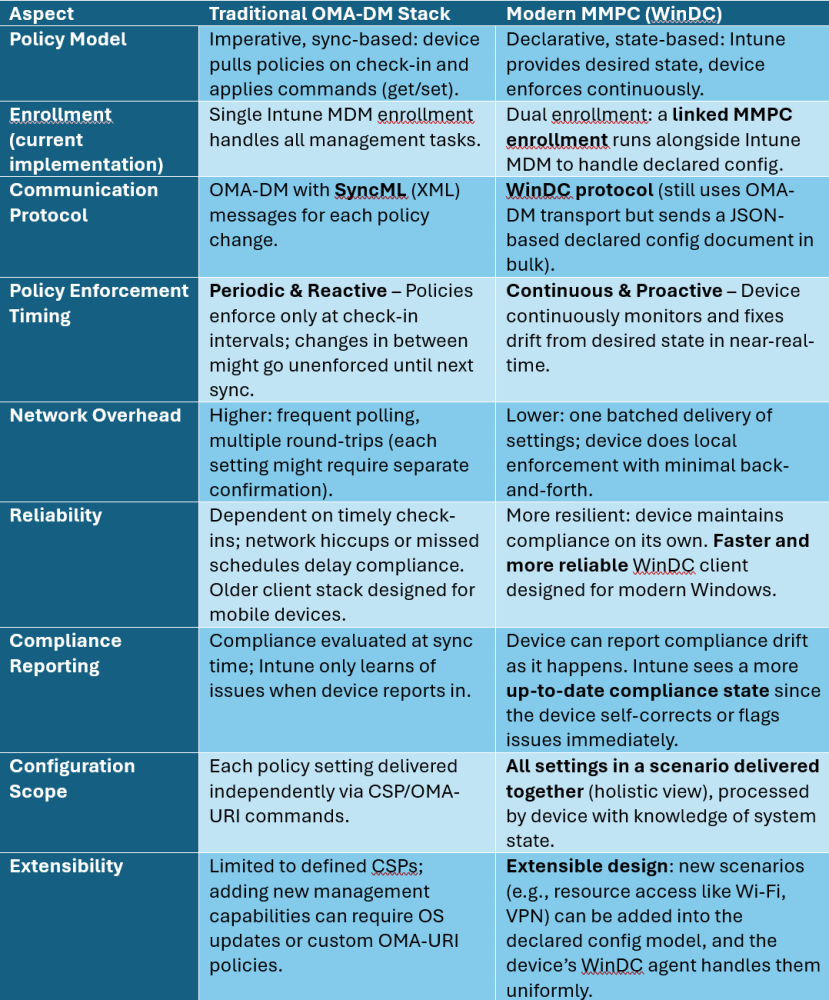
As shown above, MMP-C transforms Windows management from a slow polling system to an always-enforcing model, bringing immediate benefits in compliance and efficiency. It’s important to note that as of today, traditional OMA-DM still exists in parallel (for compatibility and any settings not yet supported in declared configuration). In effect, Windows devices with MMP-C have two policy engines running side by side: the legacy OMA-DM engine for older policies, and the new declared configuration engine for modern policies. Over time, we can expect more and more policy areas to migrate into the MMP-C/WinDC channel as it matures.
Features Leveraging MMP-C Today
You may be wondering what the timeline for the implementation of MMP-C in Intune would look like and I’m pleased to inform you that this is not merely a future vision; it is already implemented in Intune! Today!
Microsoft has begun rolling out MMP-C by integrating it with specific newly created Intune features. Endpoint Privilege Management (EPM) was the first major feature to showcase MMP-C in action, and more recently the Advanced device inventory capability (Intune’s Properties Catalog / Resource Explorer data collection) also uses MMP-C. Let’s look at these in detail:
- Endpoint Privilege Management (EPM) – Part of the Microsoft Intune Suite, EPM allows standard users on Windows to perform approved tasks with elevated privileges without needing full admin rights. For example, an IT admin can create policies that let a standard user install a specific approved application or update a printer driver that normally requires admin consent. (For a deeper dive into EPM, feel free to read my recent article on EPM vs Windows 11 Administrator Protection) When EPM was released, it introduced MMP-C’s declared configuration protocol to Intune: activating EPM and deploying an EPM policy causes Intune to push a special policy that triggers a linked enrollment into MMP-C on the device. Through this channel, the EPM agent is delivered and configured. In other words, EPM’s policy delivery does not rely solely on the old OMA-DM method; instead it uses the new cloud management pipeline (MMP-C) for clean, reliable delivery of elevation policies. This ensures the privilege elevation rules are continuously enforced on the client. EPM was essentially the “pilot” for MMP-C – giving IT a first taste of how much more smoothly policy delivery can work. EPM has demonstrated that even complex scenarios like just-in-time privilege elevation can be handled elegantly with MMP-C.
- Windows Advanced Device Inventory (Properties Catalog) – In late 2024, Microsoft introduced an enhanced device inventory capability in Intune, allowing collection of more detailed hardware and software information from Windows clients (TPM status, CPU details, disk info, etc.) to be viewed in Intune’s Resource Explorer. This feature is delivered via a “Properties Catalog” profile in Intune. Notably, device inventory is powered by MMP-C as well. When an admin creates a Properties Catalog profile and targets a device, Intune hands off the profile to MMP-C for delivery. The device, upon its next sync, receives a declared configuration document (WinDC) specifying the inventory collection settings, and as part of that, the Device Inventory Agent (a client-side component) is installed if not already present. This agent then runs on the device to gather the specified data and upload it back to the Intune service. All of this happens through the new MMP-C channel. With MMP-C, the whole process (deploy agent + config, then periodically return data) is streamlined and doesn’t bog down the standard MDM channel. In short, MMP-C enables richer device insight by supporting this inventory scenario in a scalable way.
These are the two prominent examples in-use today where Microsoft is actively using MMP-C. Additionally, the Windows platform itself is expanding what can be done via declared configuration. For instance, Windows 11 supports Declared Configuration for Resource Access – meaning things like VPN, WiFi, and certificate policies can be declared and continuously enforced in the same way. In practice, this could allow Intune (via MMP-C) to deploy network access configurations that the device will persistently maintain: if a user tries to delete a WiFi profile that’s required, the device could auto-reinstate it; if a certificate is expired or removed, the system could remediate or report it immediately. While traditional OMA-DM could deploy these configurations, it wouldn’t watch them in real-time between syncs. With MMP-C, the range of manageable settings grows along with assurance that those settings stick. It’s expected that Microsoft incrementally migrate more policy areas (like security baselines, configuration profiles, etc.) to the declared model over time.
Benefits of MMP-C for Windows Management
Adopting MMP-C’s modern management approach yields significant benefits for IT administrators and organizations. Below are the key advantages of MMP-C over the traditional OMA-URI/OMA-DM stack, and why they matter:
- Continuous Compliance & Real-Time Enforcement: “Always enforced, always up-to-date” is a fundamental promise of declared configuration. With MMP-C, devices no longer fall out of compliance between scheduled check-ins. Any drift from the intended state is detected and remediated by the device automatically. For example, if a user or malicious process tries to disable a security setting that Intune has declared should be enabled, the WinDC agent can immediately revert that change. This proactive stance greatly improves security posture and ensures configuration compliance at all times, not just at the last sync. IT admins get peace of mind that policies are “sticking” continuously, reducing the window of vulnerability.
- Faster Policy Application: Because MMP-C provides the device with all its needed settings in one go and the device handles enforcement, policy changes take effect with minimal delay. There’s no need to wait for the next check-in cycle to ensure a policy is enforced. As soon as Intune delivers the updated declared configuration (which can happen during a normal sync or an on-demand push), the device immediately applies the changes and maintains them. This can be especially beneficial in scenarios where timing matters – e.g., rapidly revoking access if a device is compromised, or swiftly rolling out a critical configuration change.
- Improved Reliability and Resilience: The legacy OMA-DM client sometimes faced issues with policies not applying correctly due to communication hiccups or complex get/set sequences. MMP-C’s approach is inherently more reliable because the device takes on the responsibility for achieving the desired state. The WinDC client has in-depth knowledge of Windows configuration internals, allowing it to apply settings in the correct order and handle dependencies or conflicts gracefully. If a setting can’t be applied immediately (perhaps waiting on another component), WinDC can retry or apply when ready. This reduces those frustrating cases where a policy might show as “pending” or fail silently. Overall success rates for policy enforcement go up. Moreover, having a second channel means even if the primary MDM channel has an issue, critical MMP-C-driven policies (like EPM rules) still get enforced.
- Lower Network and Server Load: In a traditional setup, thousands of clients polling and sending back compliance data at regular intervals can create considerable load on the service (and consume device battery and bandwidth). MMP-C’s batch policy delivery and local evaluation mean far fewer round-trips. For instance, instead of each of 50 settings being a separate conversation, Intune can deliver one package covering all 50. The device then only contacts Intune when there’s something noteworthy (like a drift report or periodic confirmation). Microsoft notes that this model “frees up server resources” and has “low latency” due to asynchronous client-side processing. For organizations, this efficient use of network bandwidth can be important, especially for devices that are remote or on metered connections. And Intune’s cloud service can scale to more devices or do more work when it’s not busy constantly rechecking the same policies.
- Scalability and Future-readiness: The architecture of MMP-C is designed to scale with modern demands. Cloud-first management is not just about moving to Intune; it’s about handling millions of devices efficiently. MMP-C’s offloading of work to the client and reducing server chatter means Intune can manage more devices concurrently without degradation. It also sets the stage for more complex policies. For instance, multi-faceted configurations that would be cumbersome with OMA-DM (due to many interdependent settings) are simpler to deploy via a single declared document. This could include things like comprehensive security baselines or entire device role configurations delivered in one shot. As Microsoft evolves Windows management, MMP-C provides a platform that can extend to new scenarios (the extensibility noted in the WinDC protocol means it can grow without requiring brand new protocols).
- Better IT Admin Experience: For administrators, many of these technical benefits translate to practical wins. Less time is spent troubleshooting “why didn’t this policy apply?” because the system is self-healing. Real-time enforcement can reduce helpdesk tickets – e.g., users can’t easily misconfigure something that leads to a support call, because the device corrects it. The Intune reporting will also be more up-to-date and trustworthy; when an admin looks at compliance or configuration status in the console, they’re seeing the true state (since the device constantly maintains that state). Over time, as more policies use MMP-C, admins will likely notice management tasks becoming more streamlined (with fewer custom scripts or workarounds needed to achieve certain configurations). In addition, onboarding new devices could become more straightforward: with the WinDC model, as soon as a device enrolls and gets its declared config, it quickly reaches the desired state without the phased, step-by-step policy application delays. This means a device provisioning (like Autopilot scenarios) could complete with all policies enforced more quickly, improving the deployment experience for both IT and end-users.
Conclusion and Future Outlook
The introduction of MMP-C marks a pivotal shift in Windows client management. It addresses long-standing challenges of the OMA-DM model – namely latency in enforcement and scalability issues – by adopting a modern, declarative approach. For IT professionals and decision-makers, MMP-C offers a path to stronger compliance, improved security, and streamlined operations, all integrated into the familiar Intune ecosystem. It’s an investment in future-proofing Windows management.
Microsoft is actively expanding MMP-C’s role. Endpoint Privilege Management was just the beginning; now inventory collection and other areas are onboard. We can anticipate that more Intune policy areas (like complex security settings, maybe even application provisioning or patch controls) will transition to MMP-C in upcoming Windows 11 releases and Intune updates. In essence, MMP-C and the Windows Declared Configuration protocol are becoming the new backbone for Intune’s “modern management” of Windows.
For organizations planning their IT strategy:
- If you’re already using Microsoft Intune, explore the features that leverage MMP-C (such as EPM or the extended device Inventory). They will give you a taste of the reliability and speed benefits.
- Prepare for a world where Windows devices are largely self-managing in terms of policy enforcement. This might alter some workflows – for example, compliance checks become continuous, and you may spend less time on routine remediation and more on defining desired states and exceptions.
- Stay informed on Windows 11 updates and Intune release notes. Microsoft is steadily improving the WinDC components so ensure your devices are on supported versions to take advantage of these capabilities.
- Consider the big picture benefits: By adopting MMP-C’s capabilities, organizations can potentially reduce support costs (fewer incidents of “my policy didn’t apply” or security drift), enhance user productivity (since compliance is maintained seamlessly), and bolster security posture (every device continuously meeting policy).
In conclusion, MMP-C represents the next step in modern management for Windows clients – aligning Windows with cloud-first, zero trust principles and the need for agility in IT. It differs significantly from the old OMA-DM stack by delivering always-enforced, declarative configurations. Features like EPM have proven its value, and the benefits in speed, compliance, and efficiency are increasingly clear. As more of Intune’s capabilities start using MMP-C, IT admins will find themselves with a more powerful toolkit to keep Windows devices configured and secure. Embracing this new platform will help organizations stay ahead in managing their Windows fleets in a cloud-connected era.

 Ben Whitmore
 Jose Schenardie
 Simon Skotheimsvik



Add comment