


 Anders Ahl
A couple of weeks ago, my wife started a new job at an organization with over 70,000 employees. You’d think that with a headcount like that, they’d have a solid grip on IT security. But surprise! The IT person handing her the laptop and phone advised her not to enroll her face or fingerprints in Windows Hello for Business or on the phone, because “it’s not secure” and “you wouldn’t want your biometric data on a corporate device”.
I’ve had countless conversations with customers over the years debunking this exact myth. And honestly, I thought we’d moved past the “someone might steal your face” phase. Apparently not.
So here we are. This post is for IT pros who still believe biometrics are risky because someone could lift your fingerprints or clone your face. Spoiler alert: they can’t. Not like that.
Please read. Please reconsider. And please don’t perpetuate outdated myths. Let’s face it (pun intended!): Biometrics are secure, convenient, and designed with privacy in mind. Don’t let misinformation leave your users fingerprinted for failure.
Modern biometric authentication – typically using fingerprints or facial recognition – offers strong security without exposing your actual biometric images. Many IT professionals field concerns from users (and indeed other IT Pros) who fear that enrolling a fingerprint or face ID might let attackers steal or their biometric identity. This report addresses those concerns by explaining how biometric data is stored and protected, and why enrolling your biometrics does not expose your true fingerprints or face to anyone. We focus on the security architecture behind fingerprint and facial recognition systems in general (exemplified by technologies like Windows Hello, Touch ID, and Face ID) and how they safeguard against theft or misuse of biometric credentials. We also include an overview of biometric privacy regulations to consider when deploying these systems.
In summary: Biometric data is stored locally as an encrypted, non-reversible mathematical template (think of it as a hash) rather than a raw image. It never leaves your device or secure hardware, making theft virtually impossible. Even if someone could access the stored data, it cannot be reconstructed into your original fingerprint or face. Additionally, biometric systems incorporate anti-spoofing measures (like liveness detection) to ensure the user is physically present, preventing fake fingerprints or photos from tricking the system. The result is a system where the convenience of biometrics is paired with robust protections, often exceeding the security of traditional passwords.
How Biometric Authentication Works (Fingerprint & Face)
Biometric login systems do not use a simple image of your fingerprint or face. Instead, during enrollment the system converts your biometric into a secure digital template:
- Fingerprint Enrollment: The fingerprint scanner captures the unique patterns of your fingerprint (ridge endings, bifurcations, etc.) and processes these into a numerical representation. Specifically, the software performs minutiae extraction, identifying key feature points and their relative positions. It then hashes or otherwise encodes these features into a template. Crucially, the full fingerprint image is not stored – only this template of salient features is kept. The process is “lossy” meaning it intentionally discards data (like fine image details) that would be required to reconstruct the original fingerprint. For example, Apple’s Touch ID creates a mathematical map of subdermal ridge flow that omits minutiae data needed to rebuild the fingerprint. This ensures that even if someone obtained the stored template, they could not produce an image of your fingerprint.
- Face Recognition Enrollment: Similarly, a facial recognition camera (such as an infrared depth camera in Windows Hello for Business (WHfB) or the TrueDepth camera in Apple Face ID) maps distinctive features of your face (the shape of your features, distances between key points, depth information, etc.). The system then constructs a numerical model or “graph” of your face and encrypts it for storage. No actual photo is saved; the stored data is a set of biometric measurements or a machine-learned feature vector. This template is often updated over time (for example, Face ID will refine the face model as your appearance changes) but it remains a secure mathematical representation, not a photograph.
Secure Storage: Once the biometric template is created, it is securely stored on the device:
- Encrypted Biometric Database: The template is stored in an encrypted form on your device. In WHfB, for instance, each fingerprint or face sensor has its own encrypted template database file. A unique cryptographic key – often protected by hardware – encrypts this database. The encryption keys themselves are secured (for example, sealed to the Trusted Platform Module (TPM) or secure enclave), meaning an attacker can’t simply copy the file and decode it on another system.
- Hardware Isolation: Modern devices use dedicated secure hardware to protect biometric data. In PCs, the TPM chip or a secure co-processor handles the storage and matching of biometrics. In smartphones and newer laptops, a Secure Enclave (Apple) or similar security processor keeps biometric templates isolated from the rest of the system. The biometric sensor (fingerprint reader or camera) is tightly integrated with this secure element. For example, Apple’s architecture ensures the sensor transmits the fingerprint/face data encrypted directly to the Secure Enclave; even the main OS cannot read that raw data. In Windows devices, some advanced external fingerprint readers store data within the reader module itself, still keeping it local to hardware.
- Local-Only (Never Uploaded): Biometric templates never leave the device. They are not sent to any server or cloud service during enrollment or authentication. WHfB explicitly guarantees that biometric data “doesn’t roam, never leaves the module, and is never sent to Microsoft cloud or external servers”. Likewise, Apple’s Face ID/Touch ID data never leaves the device or is included in backups. This local-only design means there is no central database of your fingerprints to be hacked and no transmission of your private data that could be intercepted. Each device independently stores and uses your biometric, greatly reducing the risk of large-scale compromise. Although this may present a minor usability challenge due to the inability to transfer biometric enrollments between devices (credential roaming), the enhanced security benefits ultimately take precedence over convenience.
Matching Process: When you attempt to log in:
- The sensor captures a new fingerprint or face sample.
- This new sample is processed into the same type of template (using the same algorithm used at enrollment).
- The secure module compares the new template to the stored template within the secure hardware (e.g., inside the TPM or Secure Enclave). The raw images or samples are handled in memory only inside this secure environment and typically discarded immediately after analysis.
- If the templates match sufficiently (within tolerances), the system considers the biometric authenticated and proceeds to unlock or log you in. If not, access is denied and usually you can fall back to a PIN or password.
Throughout this process, the actual fingerprint image or face photo is never needed after the initial capture – only the template is used for comparison. And that comparison happens in a locked-down environment local to the device.
Integration with Authentication Systems: In an enterprise scenario like WHfB, the biometric unlock is often tied to unlocking a cryptographic key:
- For example, WHfB uses biometrics to unlock an asymmetric key pair stored in the TPM. When your fingerprint or face is verified locally, the device uses its private key (secured by TPM) to authenticate you to the domain or service. No biometric data is ever transmitted – the authentication is completed by a cryptographic challenge/response using the key.
- Other platforms use similar approaches; for instance, Android and iOS use biometrics to unlock encryption keys or tokens on the device which then grant access – but the biometric itself isn’t sent to any server.
Bottom line: Biometric authentication is designed such that your fingerprint or face data is captured, turned into a secure digital key (template), and locked away on your device. Only your device’s secure hardware can read or use it. This architecture forms the foundation for why stealing or hijacking someone’s biometric from these systems is extraordinarily difficult.
Why Biometric Data Can’t Be Stolen or Reused by Attackers
Given the design above, fears of biometric data being hijacked are unfounded. Here’s a breakdown of common concerns and the corresponding security protections:
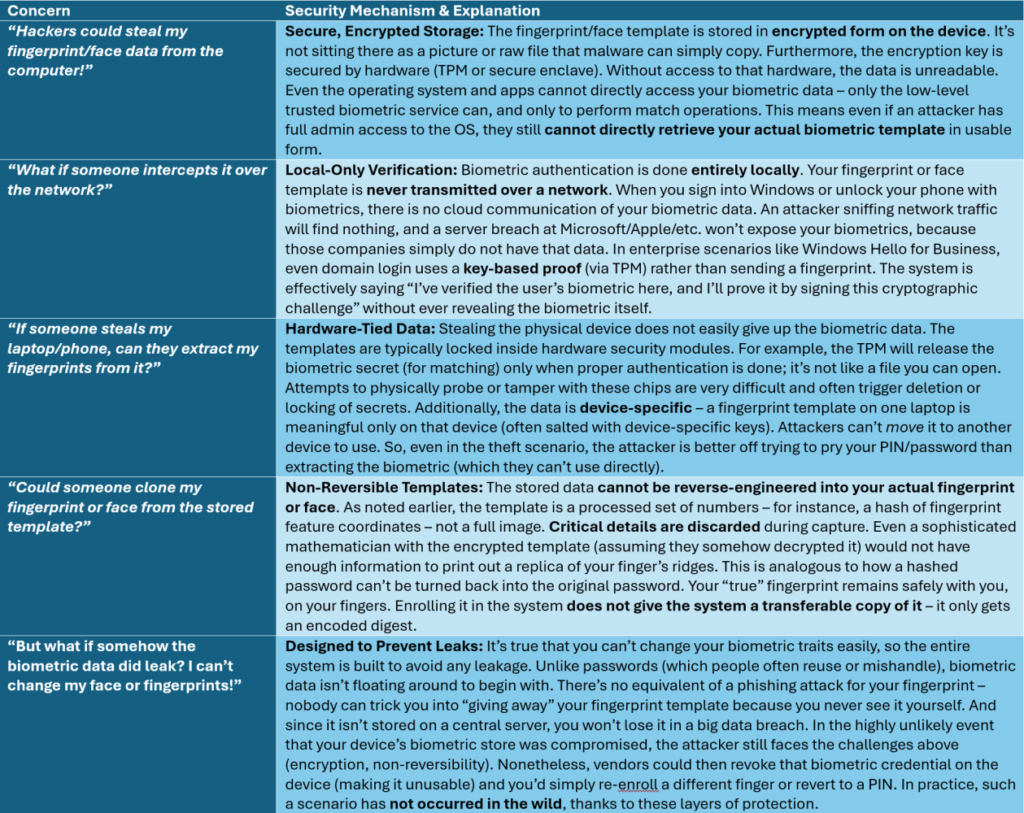
No usable data for attackers: In essence, even if an attacker managed to get whatever biometric data is on your device, they’d find a string of encrypted numbers that are useless without the device’s secure keys and nearly as useless even if decrypted without the original context. This is vastly different from stealing a password (which might be reused elsewhere) or even a password hash (which could be cracked).
To date, there have been no reports of attackers remotely lifting or reconstructing a user’s fingerprint or face data from a properly designed biometric system’s stored templates. The surface area for hijack is just not there – there’s nothing to hijack in transit, and what’s stored is indecipherable.
Protection Against Spoofing and Fake Biometrics
Another aspect of hijacking could be the fear that someone could spoof your biometric – for example, using a copy of your fingerprint or a photo of your face to impersonate you. Biometric systems include anti-spoofing (liveness detection) to address this, on top of the data security measures:
- Facial Recognition Liveness: WHfB face recognition and Apple Face ID both require signs of a live user. The infrared cameras and depth sensors check for three-dimensional shape and even responsiveness. For instance, WHfB’s anti-spoofing ensures “it’s detecting a live person, not a photo”. This may involve sensing depth/IR patterns and verifying the user’s attention (eyes looking at the camera, blinking). Apple’s Face ID does something similar, requiring attention (eyes open, looking at the device) and using neural networks to spot spoofs. High-end systems can even defeat more sophisticated attacks like realistic masks. The result: an imposter can’t just hold up your picture to unlock your device. Reported real-world spoofing of advanced face recognition is extremely rare and typically requires elaborate preparation (e.g. creating a lifelike mask of the user) – not something a casual attacker can easily do.
- Fingerprint Reader Spoofing Protection: Early fingerprint sensors (optical ones) could sometimes be fooled by a high-quality image or mold of a fingerprint. Modern readers (capacitive or ultrasonic) are much harder to trick – they rely on electrical or ultrasonic properties of real skin and the 3D structure of the fingerprint. Some sensors even detect a pulse or slight finger movement. Could someone lift your fingerprint from a surface and make a fake finger? Researchers have shown it’s possible but “anything but trivial”. It requires obtaining a “complete, high-resolution, non-smudged copy” of your fingerprint and “thousands of dollars worth of equipment” to create a working fake. This is far beyond the capability of a random hacker or nosy coworker. It’s akin to a targeted spy movie scenario. In practice, if you’re worried about such an attack, you should be equally worried about that person coercing you directly – but for most users, these scenarios are not a realistic risk.
- Multi-Factor Options: Biometric systems can also be combined with other factors for even higher security. For instance, in enterprise settings, you might require fingerprint and a PIN, or use the fingerprint to unlock a smart card. This means an attacker would need to both fake the biometric and know the PIN – an exponentially harder challenge. Many organizations find that biometrics plus a PIN (something you are + something you know) meets high security requirements while remaining convenient for users.
It’s worth noting that no authentication method is 100% infallible. But biometrics today are designed to make impersonation extremely difficult without extraordinary effort. The false match rates are very low. The chance of a random person’s biometric falsely matching is on the order of 1 in 50,000 for fingerprints and 1 in a million for faces. And those statistics assume an attacker is just guessing randomly – actively spoofing with custom-made molds or masks could raise the odds slightly, but then we are dealing with outlier scenarios (like dedicated attacker groups or forensic-level techniques). For the vast majority of threat models, the combination of encrypted local storage and liveness-secured matching makes biometric hijacking or spoofing considerably harder than guessing or stealing passwords.
Biometric Data Privacy Regulations
Because biometric data is highly sensitive, many jurisdictions have enacted privacy laws to regulate its collection, storage, and use. IT professionals implementing biometric authentication must be aware of these biometric privacy regulations, which generally aim to ensure transparency, user consent, data security, and individual control over biometric information. Here are some key regulatory frameworks and their requirements:
EU – GDPR (General Data Protection Regulation): In the European Union, biometric data used for identification is classified as “special category” personal data under GDPR Article 9. This means it’s subject to strict conditions. Explicit informed consent from the user is typically required to process such data (unless another narrow legal basis applies). Organizations must also respect data subject rights: individuals can request access to their stored biometric data, have it corrected if applicable, or deleted. Data minimization and purpose limitation principles mean you should only collect biometrics for a specific, necessary purpose. GDPR also mandates strong data protection measures; in practice, the encryption and device-local storage approach of modern biometric systems aligns well with these requirements. Non-compliance can result in severe fines – up to €20 million or 4% of global annual turnover (whichever is higher) – reflecting how seriously the EU views biometric privacy.
United States – Illinois BIPA: The U.S. has no federal law solely on biometric data, but individual states have stepped in. The most notable is the Biometric Information Privacy Act (BIPA) in Illinois. BIPA requires any private entity collecting biometrics (fingerprints, face scans, etc.) to inform the person and obtain written consent before collection. It also obliges companies to disclose the purpose and duration of retention and to protect stored biometric data using a reasonable standard of care. Critically, BIPA gives individuals a private right of action – people can sue for violations. Penalties under BIPA can be $1,000 to $5,000 per violation (per person, per incident), which has led to large class-action settlements. For example, Facebook settled a BIPA lawsuit for $650 million over its face-tagging feature that used facial recognition without proper consent. BIPA effectively forces organizations to handle biometrics with transparency and strong safeguards or face legal and financial consequences.
United States – California (CCPA/CPRA): California’s consumer privacy laws (the CCPA, updated by the CPRA) include biometric data as a form of personal information. While not as prescriptive as BIPA, these laws grant Californians rights to know what biometric data is collected about them, to request deletion of that data, and to opt out of its sale to third parties. Businesses must inform users at collection about the categories of personal data (including biometrics) being collected and the purposes. The CPRA further designates biometrics as “sensitive personal information” giving consumers the right to limit its use. These laws don’t require prior consent for biometrics in all cases, but if you’re handling customer biometric data in California, you must implement privacy notices, honor deletion requests, and secure the data to avoid liability. California’s approach is a part of a broader trend in the U.S. to regulate personal data, and violations can lead to regulatory fines or civil penalties (though only Illinois currently allows individuals to sue specifically over biometrics).
Compliance Implications: For IT departments, these regulations mean that deploying biometric authentication isn’t just a technical project but also a legal responsibility:
- Always inform users and get consent (written or explicit, depending on the law) before collecting fingerprints or face data.
- Implement strong security for stored biometric templates (which the standard system designs already do, via encryption and hardware isolation) to meet regulatory standards of care.
- Only use the biometric data for the stated authentication purpose and don’t repurpose it for other uses without further consent (aligning with purpose limitation).
- Have a retention and deletion policy – many laws require that biometric data be kept only as long as needed and then securely destroyed.
- Be prepared to respond to user requests regarding their biometric data (access or deletion requests, for example, under GDPR or CCPA).
- Monitor legal developments, as biometric privacy is a fast-evolving area; new laws or amendments may introduce additional obligations.
The good news is that the privacy-by-design architecture of biometric systems (local storage, templates instead of images, encryption) helps in compliance. For instance, keeping biometric data on-device and not sharing it minimizes exposure and aligns with regulations that discourage widespread dissemination of biometrics. Nonetheless, organizations should conduct privacy impact assessments and ensure their use of biometrics is transparent and justified.
Conclusion: Biometric Credentials Are Secure and Private
In conclusion, enrolling your fingerprints or face on modern systems does not expose your actual biometric identifiers in a way that others can steal or misuse. The fears of fingerprints being hijacked largely stem from misconceptions. Thanks to advanced security architecture – including local-only encrypted storage, non-reversible templates, hardware isolation, and liveness detection – biometric authentication today provides a very high level of security.
For IT professionals, this means you can confidently deploy fingerprint or facial recognition login as part of your security strategy, and you can reassure your users with the following key points:
- Your fingerprint/face data is never sent to any server and never shared; it stays on your device.
- The device does not save an image of your biometric – it saves an encrypted mathematical representation that cannot be backwards-engineered into your fingerprint or photo.
- Even if someone obtained that stored data, they can’t use it to impersonate you elsewhere due to encryption, device binding, and the inability to recreate the original biometric.
- Biometric systems have safeguards to ensure the person present is real (not a dummy or picture).
- There is an extremely low probability of false matches, and spoofing attacks are exceedingly complex to carry out successfully.
- In many ways, biometrics are more secure than passwords – they can’t be forgotten, guessed, or phished, and they eliminate vectors like password reuse and keylogging.
Moreover, major privacy regulations worldwide recognize the sensitivity of biometric data, and the security measures built into biometric authentication align with the goal of those laws: protecting individuals’ unique identifiers. By following best practices and regulatory guidelines, organizations can deploy biometric authentication that is both user-friendly and fully respectful of privacy.
Ultimately, when implemented properly, biometric authentication provides a convenient user experience without compromising security or privacy. It leverages something unique about you that can’t easily be taken away or used by others. By understanding and communicating these built-in protections – and by adhering to privacy laws – IT professionals can help users overcome reluctance and embrace the benefits of biometric login, enjoying quick access to systems with confidence that their faces and fingerprints remain safe and private.


 Ben Whitmore
 Jose Schenardie
 Simon Skotheimsvik



Add comment