

 Ben Whitmore
After a required Win32 app’s first run, whether the install succeeded or failed, the Intune Management Extension (IME) evaluates it again roughly every 8 hours, re-running its detection and requirement checks. It will only try to install it again once 24 hours have passed, and only if the app still isn’t detected and its requirements are met. That 24-hour hold is the Global Re-evaluation Schedule (GRS). So when an app fails, the obvious next questions might be “Will it retry?” followed by “If so, when?”. The answer is yes, but not for at least 24 hours (there are caveats).
GRS gets mentioned in plenty of forum threads. It’s also a difficult flow to spot, because there is nothing in the Intune admin center telling you it’s happening. The app shows as failed, the device checks in every hour, and nothing changes. If you don’t know about GRS, it looks like Intune has forgotten the app exists. There is no “Can we try that again please gov’nr” button.
My good friends Johan and Andrew at Via Monstra Academy invited me to run a session at their Intune Masterclass, which was the perfect excuse to get back in the lab and refocus on GRS. To better explain how it works, I built two apps that fail on purpose, pointed them at a test device and watched the IME deal with them over 25 (slightly compressed) hours. I wanted answers to four questions:
- When do the 24 hours actually start?
- Can anything on the device, such as restarting the IME service, make it retry sooner?
- What does an app that’s waiting out GRS look like in the logs and registry?
- Why doesn’t everyone love cheese?
Three timers to remember
GRS overall, and the following lab results, will make much more sense once you know that three timers are involved.
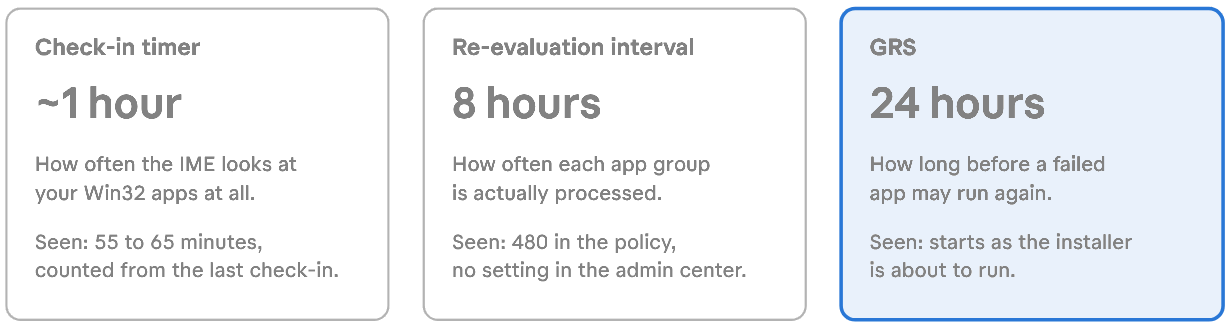
There are two terms from the logs you’ll need too:
An app group, which the IME calls a subgraph, is an app plus any apps tied to it through dependencies or supersedence. A group can also be a single app on its own (all seven groups on my test device were). The 8-hour re-evaluation interval applies to the whole group, not to each app in it.
A check-in is the IME’s regular look at your Win32 apps. In my logs, check-ins were started by the hourly timer and by a service restart. A user logon is designed to start one too.
This is what happens to each app (app group) when a check-in runs:
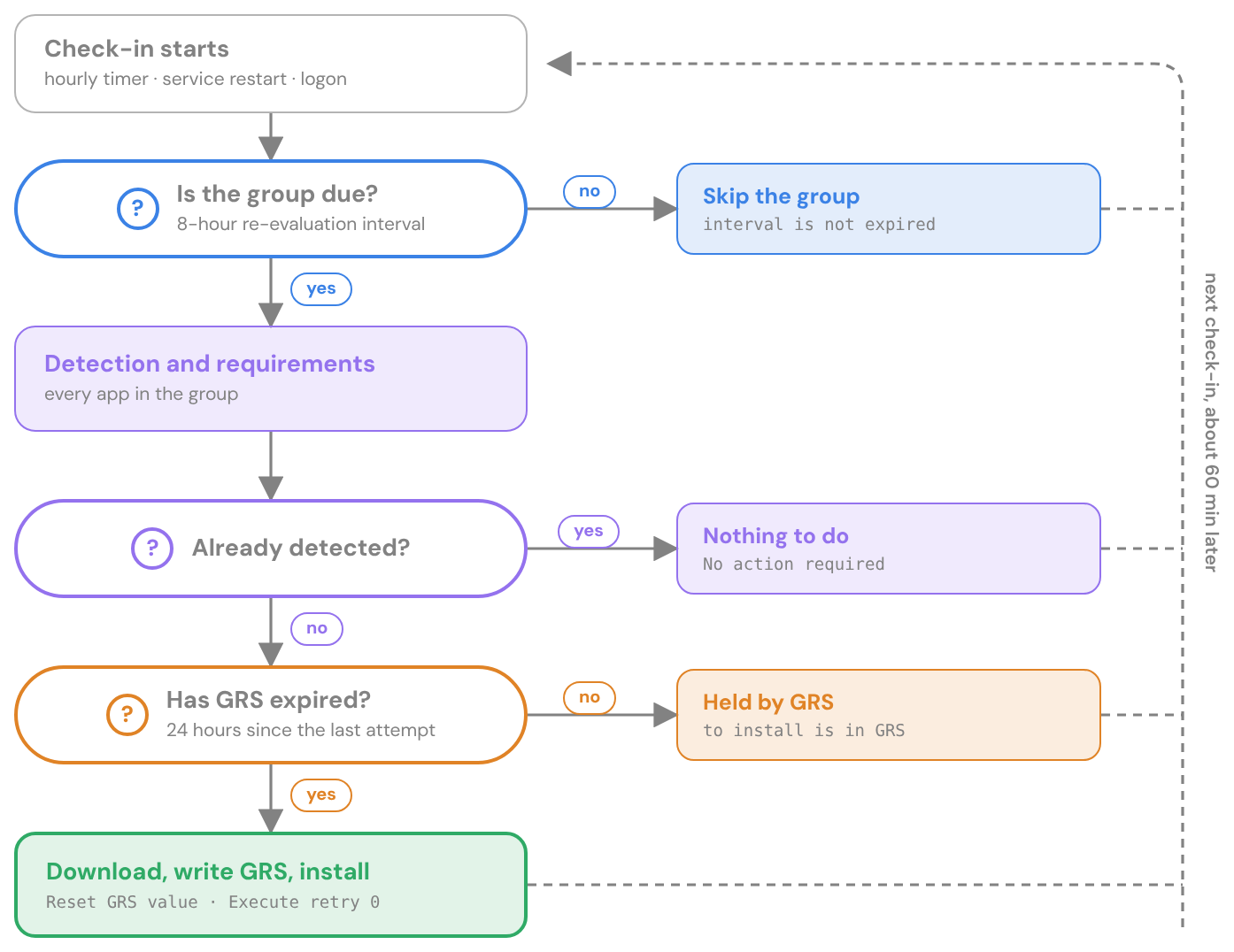
Every hourly check-in asks three questions about each app:
- Is the app’s group due? That means 8 hours since it was last evaluated. If not, the IME leaves the group alone until the next check-in.
- If the group is due, is the app still needed? The IME runs detection and requirements for every app in the group. If an app is already detected, or its requirements aren’t met, there’s nothing to install.
- If the app is still needed, has its GRS expired? That means 24 hours since its last install attempt. If not, the install is held back. If it has, the IME installs it.
So a retry needs a due group and an expired GRS at the same check-in. Groups only come due every 8 hours or so, which means a failed app waits for the first group evaluation after its 24 hours are up. That’s where the 24-to-32-hour range comes from:
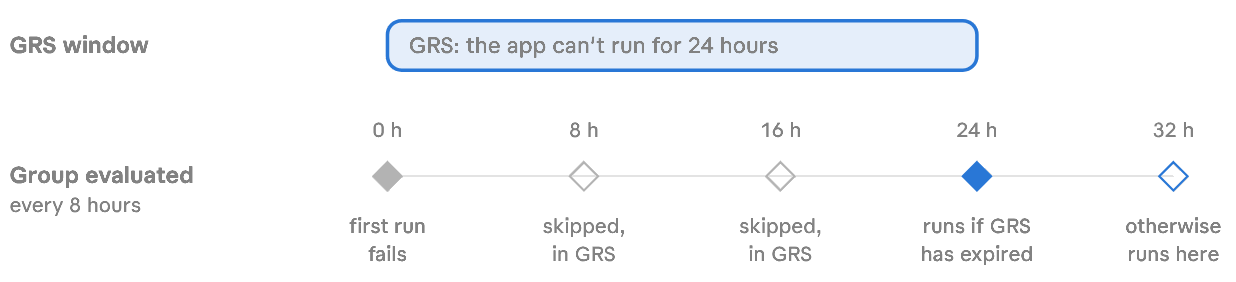
Each time the group is processed, the IME stamps it with the current time, and the next 8 hours count from there. So a check-in that runs a bit late pushes every later evaluation back too.
My lab setup
To try to show you how this works, I created two required Win32 apps, assigned as required to All Devices, with install commands that do nothing except return an exit code. Test App Retry 1.0 returns 1618, which the default return codes treat as Retry. Test App Fail 1.0 returns 1, which isn’t in the list, so it’s a plain failure.
Both Win32 apps had the default return codes configured: 0 and 1707 Success, 3010 Soft reboot, 1641 Hard reboot and 1618 Retry. An exit code mapped as Retry gets the installer run again on the spot, by default three more times, five minutes apart (we cover this later). An exit code that isn’t in the list is a plain failure.
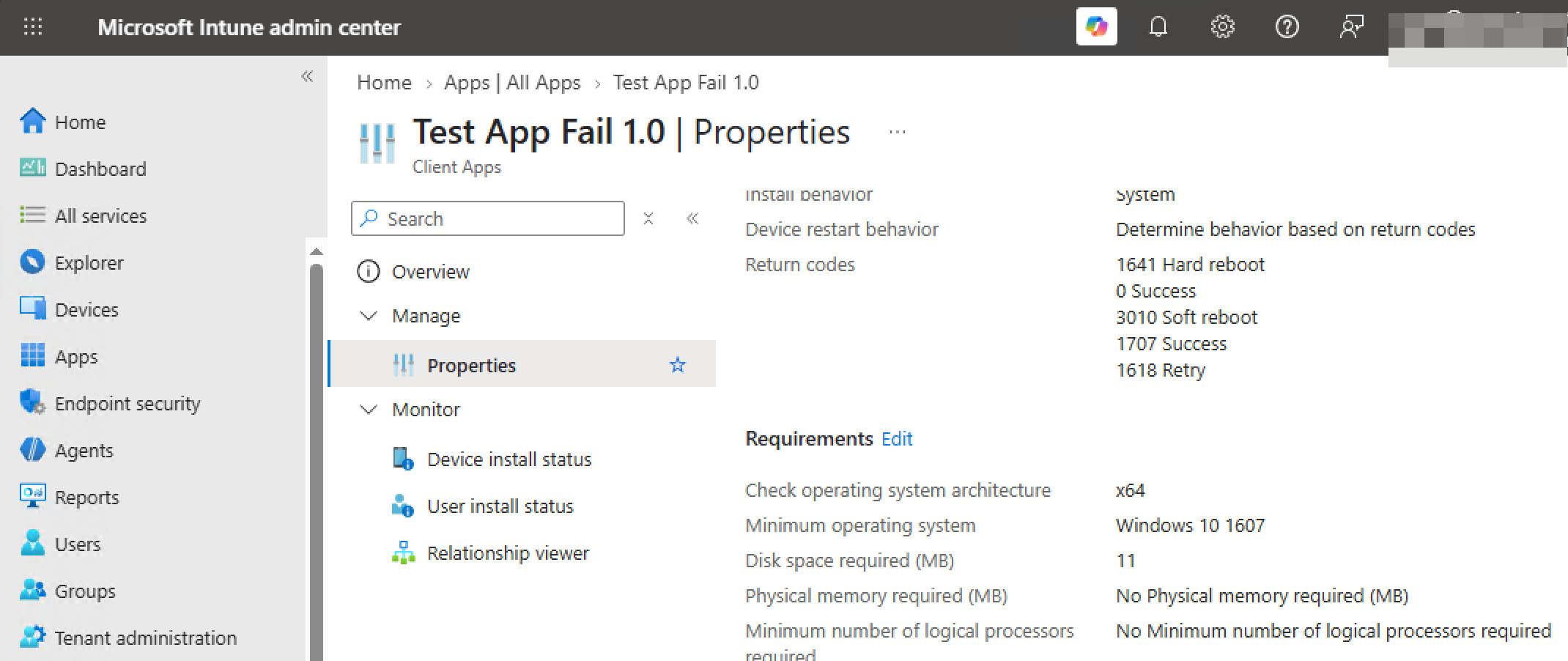
I restarted the IME service at 07:53 local time (UTC−7) so the new apps were picked up straight away. The check-in started at 07:55:06.
Four tries in fifteen minutes
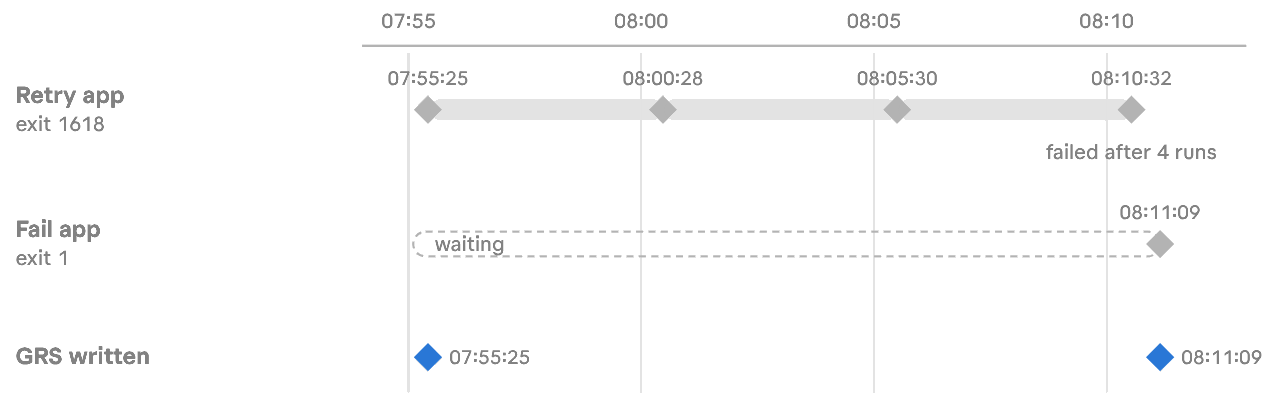
The retry app got its GRS value, ran, returned 1618, slept for five minutes and went again. Three times:
07:55:25 [Win32App][GRSManager] Reset GRS value for app: 0f80b958-… and user: a7ca016c-….
07:55:25 [Win32App][GRSManager] Saved GRS value: 11/21/2026 14:55:25 to path: …\GRS\/IABFf8Wt…=\0f80b958-…
07:55:25 [Win32App] ===Step=== Execute retry 0
07:55:28 [Win32App] lpExitCode 1618
07:55:28 [Win32App] lpExitCode is defined as Retry
07:55:28 [Win32App] Sleep 5 minute(s) before retry
08:00:28 [Win32App] ===Step=== Execute retry 1
08:05:30 [Win32App] ===Step=== Execute retry 2
08:10:32 [Win32App] ===Step=== Execute retry 3
08:10:34 [Win32App] lpExitCode 1618
08:10:34 [Win32App] App with id: 0f80b958-… could not be installed after 4 attempts.
08:10:50 [Win32App][ExecutionActionHandler] Handler completed with action status: Failed.
08:10:51 [Win32App][GRSManager] Saved GRS value: 11/21/2026 14:55:25 to path: …
After the fourth run there’s no sleep. The app is reported as Error, code -2147023278 (0x80070652, which is 1618 dressed up as an HRESULT).
Now look at the two Saved GRS value lines. GRS was written just before the first run, at 14:55:25 UTC, after the content had finished downloading, and it was saved again at the end with exactly the same value. The retries didn’t move it, and running out of retries didn’t clear it. So the 24 hours start when the installer first launches, not when the check-in begins and not after the last retry. That was my first question answered.
The fail app waits its turn
When a check-in finds several groups due, it works through them one at a time, and the next group doesn’t start until the one before it has finished. So the retry app’s three five-minute sleeps held up everything queued behind it. Think of the person in front of you ordering coffee for the whole office. The fail app didn’t get started until 08:11:
08:11:09 [Win32App][GRSManager] Saved GRS value: 11/21/2026 15:11:09 to path: …\GRS\++9EDHFr…=\ee530108-…
08:11:09 [Win32App] ===Step=== Execute retry 0
08:11:12 [Win32App] lpExitCode 1
08:11:12 [Win32App] Admin did NOT set mapping for lpExitCode: 1 of app: ee530108-…
08:11:12 [Win32App] Setting enforcementState as: Error with lpExitCode: 1 without mapping
08:11:27 [Win32App][ExecutionActionHandler] Handler completed with action status: Failed.
One app stuck on a known Retry exit code cost every app behind it a quarter of an hour. That might be interesting to know if you are timing app installation times through Autopilot.
Restarting the service changes nothing
Earlier the same morning I’d restarted the IME service at 07:32. If a restart reset anything, this is where it would show. But, it didn’t. The check-in that followed read every stored value back and skipped every app group:
07:34:35 [Win32App][ReevaluationScheduleManager] Found previous subgraph reevaluation time value: 11/21/2026 2:27:03 PM at key HQ1PlKuA…=.
07:34:40 [Win32App][GRSManager] App with id: 50437882-… is not expired. | Hash = HQ1PlKuA…= | GRSTimeUTC = 11/21/2026 2:27:23 PM
07:34:40 [Win32App][ReevaluationScheduleManager] Subgraph reevaluation interval is not expired. | Hash = HQ1PlKuA…=
Both the GRS value and the app group’s 8-hour stamp survived the service restart (hint, its stored in the registry). After my restarts at 16:15 and 00:39 (more on those shortly), the IME read back the retry app’s original 14:55:25 value both times.
Restarting the service won’t make a failed app retry sooner.
Lying to Windows about the time
I could have sat and watched CMTrace for a day. I moved the clock forwards manually instead (I had cake to bake).
My method was: turn off “Set time automatically”, move the clock forward, restart the IME service, collect the log. I restarted the service each time because the hourly timer counts elapsed time, so I wouldn’t expect moving the clock on its own to start a check-in any sooner. I’d already seen that a restart doesn’t reset either clock, so it’s a fair way to make the IME “have a look”.
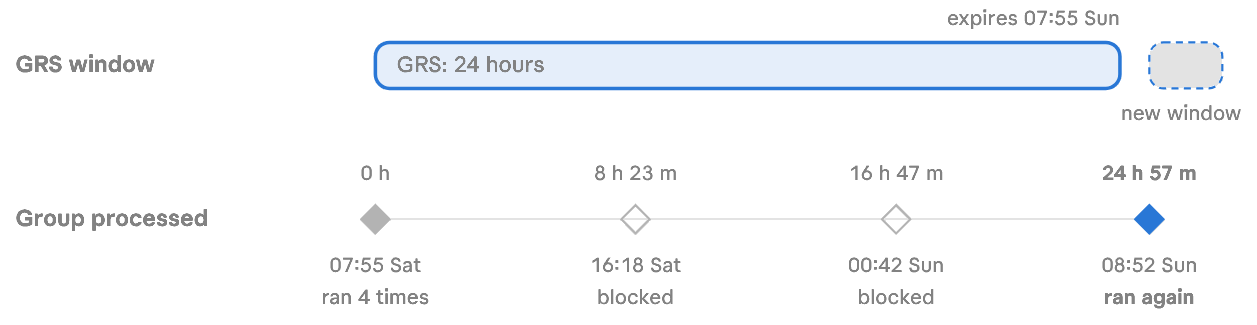
8 and 16 hour intervals
This is my “Retry” app at the first pass:
16:18:30 [Win32App][GRSManager] App with id: 0f80b958-… is not expired. | Hash = /IABFf8Wt…= | GRSTimeUTC = 11/21/2026 2:55:25 PM
16:18:30 [Win32App][ReevaluationScheduleManager] Subgraph reevaluation interval is expired. | Hash = /IABFf8Wt…=
16:18:30 [Win32App][ReevaluationScheduleManager] Setting subgraph reevaluation time with value: 11/21/2026 11:18:30 PM for subgraph with hash /IABFf8Wt…=.
16:18:32 [Win32App][DetectionActionHandler] Detection for policy with id: 0f80b958-… resulted in action status: Success and detection state: NotDetected.
16:18:32 [Win32App][ApplicabilityActionHandler] Applicability check for policy with id: 0f80b958-… resulted in action status: Success and applicability state: Applicable.
16:18:32 [Win32App][GRSManager] Saved GRS value: 11/21/2026 14:55:25 to path: …
16:18:32 [Win32App][V3Processor] Done processing subgraph.
Look at what isn’t there. No download, no new GRS time, no Execute retry. The group was due, so the IME looked at the app, ran detection and applicability, put the original GRS date back and moved on. The fail app did exactly the same, and the 16-hour pass at 00:42 was a carbon copy of this one.
A second log, AppActionProcessor.log, says it in plain English:
16:18:32 [Win32App][ActionProcessor] App with id: 0f80b958-… to install is in GRS. The app will not be enforced.
Detection still runs on these passes so Intune’s status stays current. If the app had turned up on its own, it would have been marked Installed there and then. What the detection result won’t do though is bring the retry forward.
24 hour interval
08:52:02 [Win32App][GRSManager] App with id: 0f80b958-… is expired. | Hash = /IABFf8Wt…= | GRSTimeUTC = 11/21/2026 2:55:25 PM
08:52:02 [Win32App][ReevaluationScheduleManager] Subgraph reevaluation interval is expired. | Hash = /IABFf8Wt…=
08:52:15 [Win32App][GRSManager] Reset GRS value for app: 0f80b958-… and user: a7ca016c-….
08:52:15 [Win32App][GRSManager] Saved GRS value: 11/22/2026 15:52:15 to path: …
08:52:15 [Win32App] ===Step=== Execute retry 0
08:52:18 [Win32App] lpExitCode 1618
08:57:18 [Win32App] ===Step=== Execute retry 1
09:02:20 [Win32App] ===Step=== Execute retry 2
09:07:22 [Win32App] ===Step=== Execute retry 3
09:07:24 [Win32App] App with id: 0f80b958-… could not be installed after 4 attempts.
There it is: is expired, a brand new GRS date, and the whole cycle again. The content was downloaded again too, because the IME removes it from the cache after each attempt. The fail app ran once more at 09:08:02, after queueing behind the retry app’s sleeps for another 16 minutes, and got a new GRS date of 16:08:02 UTC. That’s 24 h 57 min after its own first attempt too, because it queued behind the retry app by the same amount both times.
Why 24 h 57 min and not 24 h? The 16-hour pass happened at 00:42, which re-stamped the group, so it wasn’t due again until 08:42. That’s 47 minutes after GRS expired at 07:55. Then my restart put the check-in at 08:52. On a device left alone, the gap depends on when the hourly check-ins happen to land, and it can be up to 8 hours plus the wait for the next check-in.
One more thing from that pass: my three apps that had installed successfully the morning before also logged is expired. Nothing happened to them, because they were detected. GRS expiring only matters for apps that still need installing.
Is this a fair test?
If you’re the sort of reader who squints at the method before trusting the results, here’s where I’ve landed on the evidence. It kinda matches with my existing knowledge around GRS.
What this does prove is the IME’s arithmetic and the order of its checks. The IME compares stored dates with the device clock, so a clock moved forward looks the same to it as time passing, and at 8, 16 and 24 hours it made exactly the decisions you’d expect. It also shows the life of a GRS value: written once just before the first attempt, untouched by retries, not cleared when they run out, and replaced only when the next attempt starts.
What it doesn’t prove is the natural timing. Every pass after the first was started by my service restart, so the 24 h 57 min is real, but it reflects when I happened to trigger the 16-hour pass. A device left alone could land anywhere in the 24-to-32-hour window.
My second device, on the newer 1.108.101.0 IME, used different wording for a group that wasn’t due, so expect log lines to drift between versions.
One warning if you try this yourself. Moving the clock forward can upset sign-in and certificate checks, and it leaves future-dated stamps behind, so your test apps stay blocked until real time catches up. Do it on a lab device, not on someone’s laptop in Finance. Or skip the time travel approach altogether…and give it a day.
Reading GRS on your own device
Where it lives
HKLM\SOFTWARE\Microsoft\IntuneManagementExtension\Win32Apps\{userId}\GRS\{hash}\{appId}
{userId}is the session the IME processed the app in, not who the app is assigned to. My test apps were assigned to All Devices, but with me signed in they were processed in my session, so their GRS values sit under my Entra ID user ID (seen). The all-zeros key,00000000-0000-0000-0000-000000000000, is the device’s own session. The IME only uses it when no Entra ID user is signed in, during the device phases of ESP, or on multi-session Windows (by design, untested). You’ll seeAdd MDM Device session idin AppWorkload.log when it does.{hash}is the app group, and it matches theHash = …value in the log (more on that below).{appId}is the app’s ID, the same one you’ll find in the Intune admin center URL.
Each app’s value is a string holding a UTC date.
This is the retry app’s key just after its second attempt (seen). Two values sit side by side: the app’s GRS date, 11/22/2026 15:52:15, and SubgraphEvaluationTimeUTC, the group’s 8-hour stamp, 11/22/2026 15:52:02. Both match the log to the second:
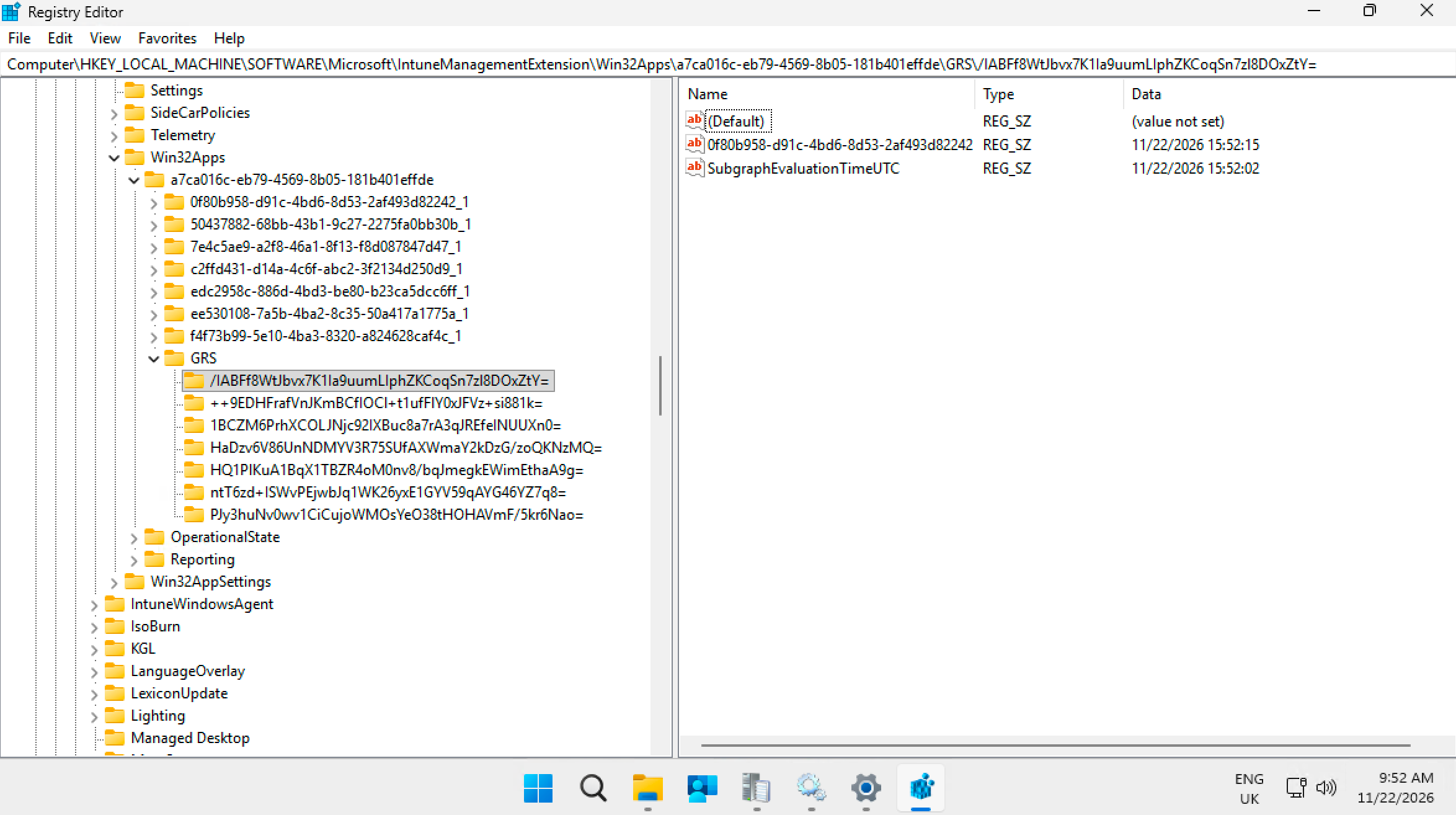
08:52:02 [Win32App][ReevaluationScheduleManager] Setting subgraph reevaluation time with value: 11/22/2026 3:52:02 PM for subgraph with hash /IABFf8Wt…=.
08:52:15 [Win32App][GRSManager] Saved GRS value: 11/22/2026 15:52:15 to path: a7ca016c-…\GRS\/IABFf8Wt…=\0f80b958-…
Note the 13 seconds between them. The IME stamps the group when it starts processing it, and stamps the app a few seconds later, just as its installer runs.
The hash keys
The key name under GRS isn’t the app ID. It’s a hash, and it’s the same value the log prints as Hash = …, so you can jump from a log line straight to the right key. There’s one key per app group. In my lab, this also includes two apps that never needed installing, so a group gets a key whether or not any app in it has ever run.
What goes into the hash is most probably things like the app’s policy settings, such as its version, intent, assignment and install settings (theoretical..not dug into that yet).
In theory, editing the app should give it a new GRS hash and a fresh start in the GRS world.
I’ve seen edits to an existing app take quite a while to be picked up by the IME, even after a service restart. Something is being cached somewhere, but I haven’t tested where yet. A new app has a new ID and a new group, so there’s no old GRS date or 8-hour stamp to wait on, and it gets processed at the next check-in.
Morale of the story, if you want a change to a Win32 app to hit the device fast, just create a new app, don’t edit the existing one. The only draw back here is you lose historical reporting for that managed app but compliance data soomn starts to build up again.
The log lines, and what each one tells you
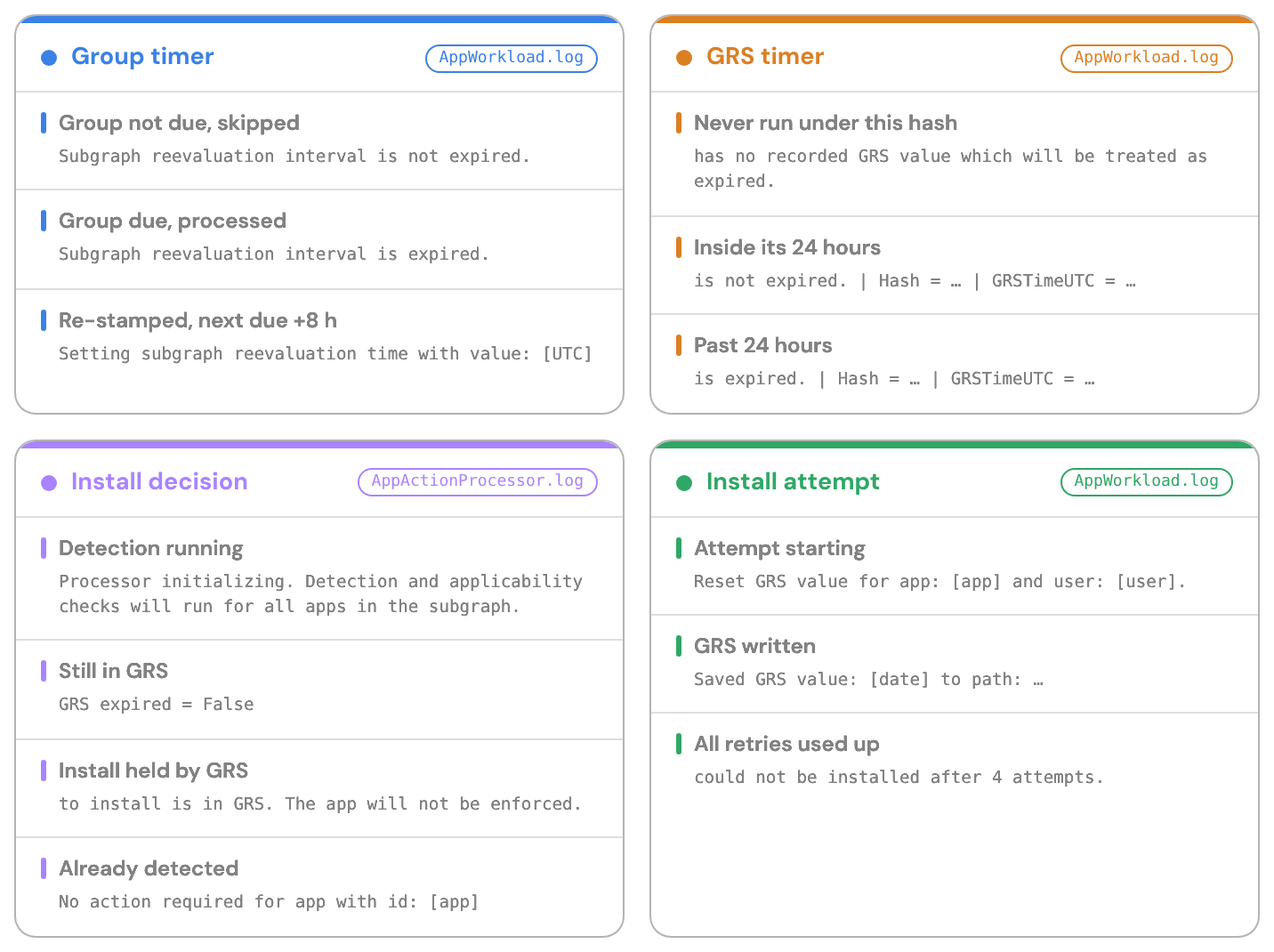
My second device, on the newer 1.108.101.0, logged a group that wasn’t due as [Win32App][V3Processor] Reevaluation interval is not expired for subgraph {id} and no override condition applies. Skipping processing., so search for both wordings.
Two logs, two halves of the story
This one nearly caught me out. AppWorkload.log shows the timers and the detection results, but it never says an install was skipped. That’s in AppActionProcessor.log, which only has entries when a group is due:
16:18:30 [Win32App][ActionProcessor] Processor initializing. Detection and applicability checks will run for all apps in the subgraph.
16:18:32 [Win32App][ActionProcessor] App with id: 0f80b958-… … Detection = NotDetected … GRS expired = False
16:18:32 [Win32App][ActionProcessor] Found: 1 apps with intent to install: [0f80b958-…]
16:18:32 [Win32App][ActionProcessor] App with id: 0f80b958-… to install is in GRS. The app will not be enforced.
Watch the wording: is not expired in AppWorkload.log and GRS expired = False in AppActionProcessor.log mean the same thing, which is that the app is still in GRS.
So your app hasn’t retried
Open C:\ProgramData\Microsoft\IntuneManagementExtension\Logs\AppWorkload.log in CMTrace and work through it in this order. You’ll need the app’s ID, which is in the URL when you open the app in the Intune admin center.
- Find the last real attempt. Search for the app ID next to
Reset GRS value for app, which only appears when an install is about to start. TheSaved GRS valueline straight after it is when the 24 hours started. Remember it’s UTC. - Check what the installer returned. Search for
lpExitCodeafter that line, and look fordefined as Retry,could not be installed afterorAdmin did NOT set mapping. - Find the latest check-in. Search for
Starting app check inand take the most recent. - See whether the app is still in GRS. Look for the app ID next to
GRSTimeUTC.is not expiredmeans you’re inside the 24 hours. Copy theHash =value from that line. - See whether the group was due. Search for that hash next to
Subgraph reevaluation interval is not expired(not due, skipped) oris expired(due, processed). - If the group was due, see why nothing installed. Open AppActionProcessor.log and search for the app ID. to install is in GRS confirms GRS is the reason. No action required means detection found the app. A start time that isn’t due yet, or blocked on app with id, is a different reason entirely.
- Still nothing after a day and a half, with the device switched on and the user signed in? Then it’s probably not GRS. Check the assignment, and the applicability and detection results in the same check-in. And no, restarting the IME service again won’t change the answer.
Retries inside one attempt
GRS decides when an app is tried again between check-ins. Inside a single attempt, the installer’s exit code decides whether the IME has another go on the spot, but only if that exit code is configured as Retry in the app’s return codes. The defaults include one, 1618, which is why my retry app retried. An exit code that isn’t in the list, or is mapped to anything else, never gets an on-the-spot retry, however many retries are allowed. My fail app’s exit code 1 got one run and that was it.
The retry settings
These come down with the app’s policy. The Get policies payload for my test apps carried "MaxRetries":3,"RetryIntervalInMinutes":5,"MaxRunTimeInMinutes":65, and the return codes, with 1618 as type Retry (seen). So that’s 3 retries after the first run, 5 minutes between them, and the run time I’d set. Four runs five minutes apart is exactly what the log shows (seen). The log also gives you the run time: Installer process timeout milliseconds: 3900000. is the 65 minutes I’d set on the test apps, and one of my other apps logged 3600000, the 60-minute default (seen).
Attempts are numbered from 0, so three retries means four runs.
How the exit code is read
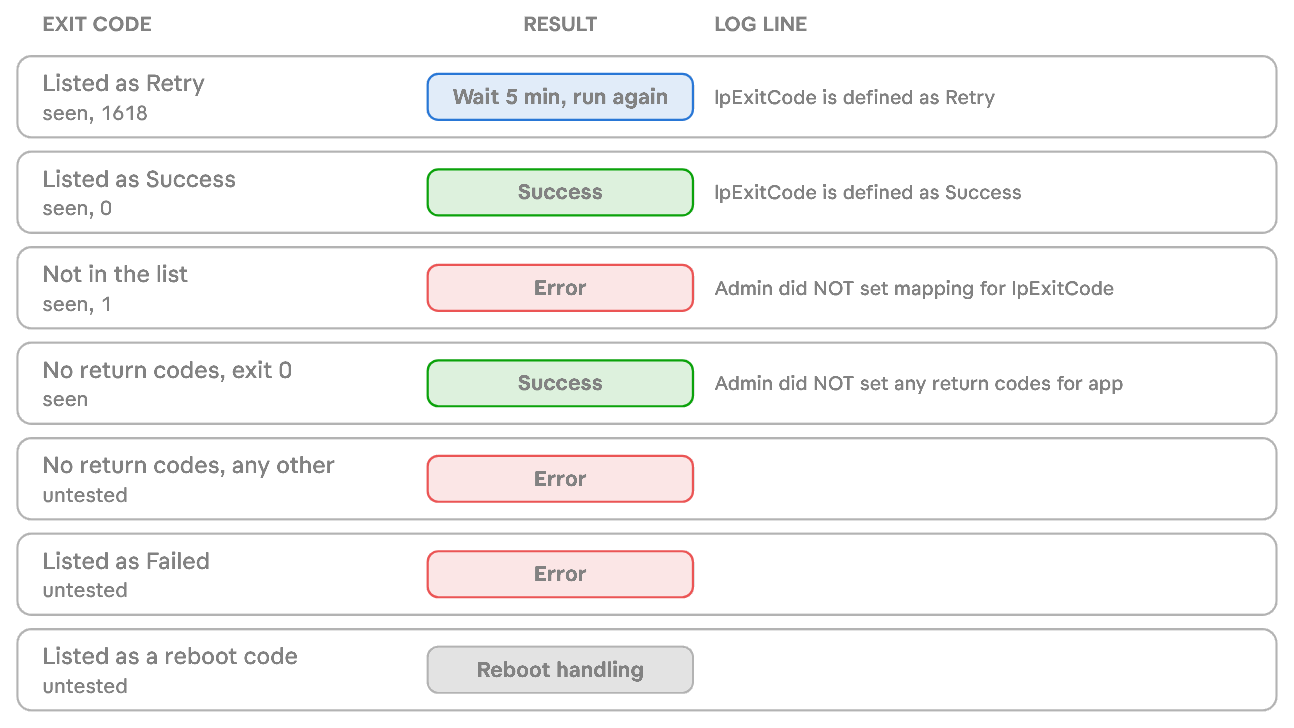
Coincidentally, when doing more testing, my second device caught a real one when an installer returned 1618 because something else was mid-install:
12:10:47 [Win32App] ===Step=== Execute retry 0
12:10:48 [Win32App] lpExitCode 1618
12:10:48 [Win32App] lpExitCode is defined as Retry
12:10:48 [Win32App] Sleep 5 minute(s) before retry
12:15:48 [Win32App] ===Step=== Execute retry 1
12:20:48 [Win32App] ===Step=== Execute retry 2
12:25:49 [Win32App] ===Step=== Execute retry 3
12:25:49 [Win32App] lpExitCode 1618
Timeouts, sign-outs and detection
- My test apps logged
Installer process timeout milliseconds: 3900000., which is the 65-minute maximum run time I’d set on them. By design, an installer that runs longer is marked as failed, the IME doesn’t stop the process, and GRS is cleared so the app can run next time its group is due (untested). - A user-context app with nobody signed in is designed to fail rather than wait for a user.
- Detection has the last word. If the exit code says success but the detection rule can’t find the app, the result is designed to be Error 0x87D1041C, with
Exitcode is defined as success but it actually failed according to detection result. GRS was written before the installer ran, so the normal 24-hour wait applies (untested).
Things I haven’t tested (yet)
MSI apps during ESP
By design, during the Enrollment Status Page, Win32 apps the IME treats as MSI get 40 common MSI error codes (1618 among them) added as Retry, unless you’ve mapped them yourself. They also get 15 retries, 3 minutes apart, instead of 3 and 5. MSI line-of-business apps aren’t affected, because the Windows MDM client installs those, not the IME.
WinGet apps (Microsoft Store app (new))
These go through the same GRS logic. On my second device (IME 1.108.101.0) on 20 November, the IME wrote GRS just before starting the WinGet install (seen):
[Win32App][GRSManager] Saved GRS value: 11/20/2026 13:19:09 to path: f7bfa0dc-…\GRS\V1yXrzku…=\af721e3b-…
[Win32App][WinGetApp][WinGetAppExecutionExecutor] Starting execution of app with id: af721e3b-… and context: UserContext.
By design there’s no retry loop in the IME for WinGet apps, so a failed Store app waits out the 24 hours, unless the install timed out, which is designed to clear GRS (untested). Whether WinGet retries anything itself, I haven’t gone down that rabbit hole yet.
Company Portal
A user installing an available app from Company Portal starts a check-in that skips the 8-hour interval, and available apps are designed to ignore GRS. So a user can retry a failed available app straight away. If the same app is also assigned as required, it’s treated as required and GRS applies.
Summary
The IME writes a timestamp just before it runs an installer, and in every failure I threw at it, it wouldn’t run that installer again for at least 24 hours. A Retry exit code gets you up to three more goes in the same check-in, five minutes apart, and that’s your lot until tomorrow. Because groups are only processed every 8 hours, “tomorrow” means 24 hours and a bit. AppWorkload.log shows the timers, and AppActionProcessor.log tells you in plain English when GRS is holding an app back.


 Maurice Daly




Add comment